> ## Documentation Index
> Fetch the complete documentation index at: https://docs.zuper.co/llms.txt
> Use this file to discover all available pages before exploring further.
# Overview
Imagine having all your business data at your fingertips, helping you track jobs, invoices, or quotes with ease. Zuper’s reporting tools make this a reality, guiding you through a simple process to access and create reports tailored to your needs.
Initially, Zuper provided a set of ready-to-use reports to help you quickly understand your business. These pre-built reports, like the Jobs Master Report, Invoice Summary Report, and Employee Utilization Report, covered a wide range of areas and were designed to give you instant insights without any setup. You can still access these reports by navigating to the sidebar and selecting the **Legacy Reports** section, where you will find a full list of these original reports ready to use.
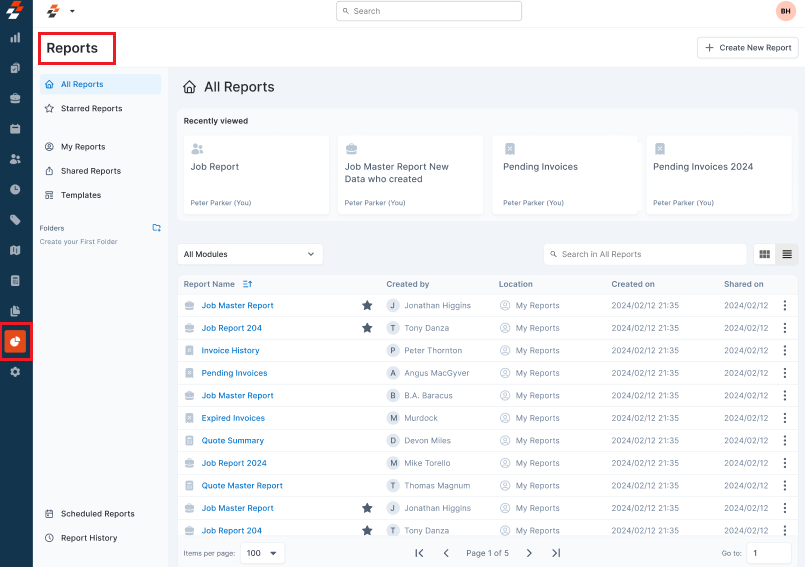
To give you even more control, Zuper is introducing a more powerful way to create reports as the platform evolves. You can start by clicking the **Reports** module in the left navigation menu and selecting **Reports** (beta version). You’ll land on the **Reports** builder home page, a powerful tool that lets you create your own reports. This enables you to visualize any field's information needed for insightful reports. Using this feature, you can transform raw data into actionable insights.
You can create **Summary** or **Detailed** Reports by selecting fields from key modules like Jobs, Invoices, Customers, Assets, teams, and so on. You can also explore pre-built report templates, which allow you to customize by modifying fields, applying filters, and organizing fields to suit your specific needs. Once your report is set up, you can schedule it to run automatically and deliver real-time information without any manual effort.
With Zuper’s reporting tools, you can easily monitor, spot trends, and make better decisions, all in just a few clicks.
 ## Main benefits of Report Builder
With **Zuper’s Report Builder**, you’re not limited to standard templates. You can also design your own reports that suit your needs by:
* **Choosing specific fields** – You can select the exact field you need from different key modules.
* **Applying advanced filters** – You can narrow down your reports by applying filters and conditions.
* **Grouping and summarizing** – You can aggregate data for better insights.
* **Exporting and sharing** – You can download the reports or grant direct access to team members.
* **Scheduling** – You can schedule reports to generate and deliver insights at your preferred frequency, whether daily, weekly, or monthly.
### Legacy reports vs. Report Builder
| | Legacy reports | Report Builder |
| ------------------ | ------------------------ | -------------------------------------- |
| **Availability** | Included in all plans | Paid add-on |
| **Setup required** | None | Yes — you configure fields and filters |
| **Customization** | Not customizable | Fully customizable |
| **Scheduling** | Not available | Available |
| **Sharing** | Not available | Available |
| **Best for** | Quick, standard insights | Custom, business-specific reporting |
### Modules for Reporting in Zuper
In Zuper, reports are built using data from key modules that represent essential aspects of your business operations. Selecting the right modules allows you to create customized, data-driven reports tailored to your needs.
**Available Modules:**
* Organization
* Customer
* Property
* Users
* Teams
* Products
* Assets
* Jobs (Timelogs, Service Tasks)
* Estimates
* Invoices
* Service Contracts
* Timesheets
Report Builder lets you pull data from 12 modules. Each module gives you a specific set of fields you can add as columns, apply as filters, or group by when you build a report. Knowing what each module contains helps you choose the right one before you start — and avoids building a report only to find the data you need lives somewhere else.
**Custom fields** appear inside Report Builder for any module where your administrator has configured them. They are listed as **Custom Fields** in each module reference below. The fields available to you depend on your account configuration.
**Organization vs. Property — what is the difference?** An **Organization** report surfaces company-level data: who the client entity is, billing details, and contact information. A **Property** report surfaces location-level data: where service is delivered, the site address, and the associated contact.
A single organization can have many properties. Use **Organization** reports for account management and billing. Use **Property** reports for dispatching, territory analysis, and site history.
**What it covers:** Company-level client records — businesses, multi-branch accounts, and corporate entities your team services.
| Field | Description |
| ----------------- | ---------------------------------------------------- |
| Organization Name | The company or business name |
| Organization Code | System-generated unique identifier |
| Primary Email | Main contact email for the organization |
| Primary Phone | Main contact phone number |
| Billing Address | The organization's billing address |
| Website | The organization's website URL |
| Tax Number | Tax or VAT ID on file |
| Notes | Internal notes attached to the organization |
| Created Date | Date the organization record was created |
| Custom Fields | Any admin-configured custom fields for organizations |
**Use this report to:** Audit your organization records, export a client list for CRM sync, or identify organizations with missing contact information.
**What it covers:** Physical service locations — homes, offices, warehouses, or any site where field work is performed. A property is always linked to a customer or organization.
| Field | Description |
| ----------------------- | ------------------------------------------------------- |
| Property Name | Name or label for the location |
| Property Code | System-generated unique identifier |
| Service Address | Full address of the property |
| Associated Customer | Customer linked to this property |
| Associated Organization | Organization linked to this property |
| Property Type | Classification — for example, Residential or Commercial |
| Notes | Internal notes on the property |
| Created Date | Date the property record was created |
| Custom Fields | Any admin-configured custom fields for properties |
**Use this report to:** Export a list of all service locations, identify properties with no associated customer, or pull a list of sites of a specific type for scheduling or territory planning.
**What it covers:** Individual contact records — the people who receive services or communicate with your field team.
| Field | Description |
| ----------------------- | ------------------------------------------------ |
| Customer Name | First and last name |
| Customer Code | System-generated unique identifier |
| Email | Customer's email address |
| Phone | Customer's phone number |
| Address | Customer's primary address |
| Associated Organization | Organization the customer belongs to, if any |
| Notification Preference | Preferred contact method |
| Created Date | Date the customer record was created |
| Custom Fields | Any admin-configured custom fields for customers |
**Use this report to:** Review contact completeness, segment customers by notification preference, or export a contact list for outreach.
**What it covers:** All work orders — scheduled, in progress, and completed. The Jobs module also exposes sub-module data for Timelogs and Service Tasks.
| Field | Description |
| ---------------- | ------------------------------------ |
| Job Title | Name of the job |
| Job Number | System-generated job reference |
| Job Category | Category or type assigned to the job |
| Status | Current job status |
| Priority | Job priority level |
| Scheduled Date | When the job is scheduled |
| Due Date | Job deadline |
| Assigned User(s) | Technician or technicians assigned |
| Team | Assigned team |
| Customer | Associated customer |
| Organization | Associated organization |
| Property | Associated service location |
| Service Address | Where the work is performed |
| Job Value | Total value of the job |
| Created Date | Date the job was created |
| Completed Date | Date the job was marked complete |
| Custom Fields | Any job-level custom fields |
**Timelogs sub-fields:** Clock-in time, clock-out time, work duration, travel duration, and user.
**Service Tasks sub-fields:** Task name, status, assigned user, completion date, and custom field values.
**Use this report to:** Track job completion rates, review technician workloads, or analyze job value by category or team.
**What it covers:** Quotes sent to customers before job confirmation.
| Field | Description |
| --------------- | --------------------------------------------- |
| Estimate Number | System-generated reference |
| Estimate Title | Quote title |
| Status | Draft, Sent, Accepted, Declined, or Converted |
| Customer | Recipient of the quote |
| Organization | Associated organization |
| Total Amount | Quoted value |
| Created Date | Date the estimate was created |
| Expiry Date | Quote expiry date |
| Custom Fields | Any estimate-level custom fields |
**Use this report to:** Monitor quote conversion rates, identify expired estimates that were not followed up on, or review outstanding quotes by customer.
**What it covers:** Billing records generated from jobs or created manually.
| Field | Description |
| -------------- | ------------------------------------ |
| Invoice Number | System-generated reference |
| Invoice Status | Draft, Sent, Partially Paid, or Paid |
| Customer | Billed customer |
| Organization | Associated organization |
| Job | Linked job, if any |
| Invoice Date | Date the invoice was issued |
| Due Date | Payment due date |
| Subtotal | Pre-tax amount |
| Tax | Tax applied |
| Total Amount | Full invoice value |
| Amount Paid | Payments received to date |
| Balance Due | Outstanding amount |
| Custom Fields | Any invoice-level custom fields |
**Use this report to:** Track outstanding balances, identify overdue invoices, or reconcile payments received within a date range.
**What it covers:** Equipment and assets tracked in the system.
| Field | Description |
| ------------------- | ----------------------------------- |
| Asset Name | Name of the asset |
| Asset Code | System-generated identifier |
| Category | Asset type or category |
| Status | Active, Inactive, or Decommissioned |
| Associated Customer | Customer who owns or uses the asset |
| Associated Property | Property where the asset is located |
| Serial Number | Asset serial number |
| Purchase Date | Date of purchase |
| Warranty Expiry | Warranty end date |
| Custom Fields | Any asset-level custom fields |
**Use this report to:** Identify assets nearing warranty expiry, audit asset locations by property, or review decommissioned equipment.
**What it covers:** Team members and technicians in the account.
| Field | Description |
| ------------- | ---------------------------------------------------------------- |
| User Name | Full name |
| Employee Code | System-generated or manually assigned ID |
| Role | User's role — for example, Admin, Dispatcher, or Field Executive |
| Team | Team the user belongs to |
| Email | User email address |
| Phone | User phone number |
| Status | Active or Inactive |
| Skills | Assigned skillsets |
**Use this report to:** Review team composition by role or skill, identify inactive users, or export a staff directory.
**What it covers:** Groups of users organized for dispatching or management.
| Field | Description |
| --------- | --------------------------- |
| Team Name | Name of the team |
| Team Code | System-generated identifier |
| Members | Users assigned to the team |
| Manager | Designated team manager |
**Use this report to:** Audit team membership, verify manager assignments, or identify teams with no assigned members.
**What it covers:** Parts, products, and services in your catalog.
| Field | Description |
| ------------------ | ---------------------------------- |
| Product Name | Name of the part or service |
| SKU | Stock keeping unit |
| Category | Product category |
| Type | Part, Service, or Labor |
| Unit Price | Selling price |
| Cost Price | Purchase or cost price |
| Stock Quantity | Units on hand, for inventory items |
| Warehouse Location | Storage location |
| Custom Fields | Any product-level custom fields |
**Use this report to:** Audit stock levels, compare cost and selling prices, or review catalog items by category or type.
**What it covers:** Daily attendance and shift-based time tracking for your team.
| Field | Description |
| -------------- | ---------------------------------- |
| User | Employee name |
| Date | Timesheet date |
| Clock-In Time | When the user punched in |
| Clock-Out Time | When the user punched out |
| Total Hours | Total duration for the shift |
| Status | Pending, Approved, or Rejected |
| Notes | Any remarks on the timesheet entry |
**Use this report to:** Review attendance by team member or date range, identify unapproved timesheets, or calculate total hours worked in a period.
**What it covers:** Ongoing maintenance or service agreements with customers.
| Field | Description |
| ---------------------- | -------------------------------- |
| Contract Name | Name of the contract |
| Contract Number | System-generated reference |
| Status | Active, Expired, or Cancelled |
| Customer | Associated customer |
| Organization | Associated organization |
| Start Date | Contract start date |
| End Date / Expiry Date | Contract end date |
| Contract Value | Total contract amount |
| Custom Fields | Any contract-level custom fields |
**Use this report to:** Identify contracts nearing expiry, review active agreements by customer or organization, or track contract value across your account.
Report Builder lets you pull data from 12 modules. Each module gives you a specific set of fields you can add as columns, apply as filters, or group by when you build a report. Knowing what each module contains helps you choose the right one before you start — and avoids building a report only to find the data you need lives somewhere else.
**Custom fields** appear inside Report Builder for any module where your administrator has configured them. They are listed as **Custom Fields** in each module reference below. The fields available to you depend on your account configuration.
**Organization vs. Property — what is the difference?** An **Organization** report surfaces company-level data: who the client entity is, billing details, and contact information. A **Property** report surfaces location-level data: where service is delivered, the site address, and the associated contact.
A single organization can have many properties. Use **Organization** reports for account management and billing. Use **Property** reports for dispatching, territory analysis, and site history.
**What it covers:** Company-level client records — businesses, multi-branch accounts, and corporate entities your team services.
| Field | Description |
| ----------------- | ---------------------------------------------------- |
| Organization Name | The company or business name |
| Organization Code | System-generated unique identifier |
| Primary Email | Main contact email for the organization |
| Primary Phone | Main contact phone number |
| Billing Address | The organization's billing address |
| Website | The organization's website URL |
| Tax Number | Tax or VAT ID on file |
| Notes | Internal notes attached to the organization |
| Created Date | Date the organization record was created |
| Custom Fields | Any admin-configured custom fields for organizations |
**Use this report to:** Audit your organization records, export a client list for CRM sync, or identify organizations with missing contact information.
**What it covers:** Physical service locations — homes, offices, warehouses, or any site where field work is performed. A property is always linked to a customer or organization.
| Field | Description |
| ----------------------- | ------------------------------------------------------- |
| Property Name | Name or label for the location |
| Property Code | System-generated unique identifier |
| Service Address | Full address of the property |
| Associated Customer | Customer linked to this property |
| Associated Organization | Organization linked to this property |
| Property Type | Classification — for example, Residential or Commercial |
| Notes | Internal notes on the property |
| Created Date | Date the property record was created |
| Custom Fields | Any admin-configured custom fields for properties |
**Use this report to:** Export a list of all service locations, identify properties with no associated customer, or pull a list of sites of a specific type for scheduling or territory planning.
**What it covers:** Individual contact records — the people who receive services or communicate with your field team.
| Field | Description |
| ----------------------- | ------------------------------------------------ |
| Customer Name | First and last name |
| Customer Code | System-generated unique identifier |
| Email | Customer's email address |
| Phone | Customer's phone number |
| Address | Customer's primary address |
| Associated Organization | Organization the customer belongs to, if any |
| Notification Preference | Preferred contact method |
| Created Date | Date the customer record was created |
| Custom Fields | Any admin-configured custom fields for customers |
**Use this report to:** Review contact completeness, segment customers by notification preference, or export a contact list for outreach.
**What it covers:** All work orders — scheduled, in progress, and completed. The Jobs module also exposes sub-module data for Timelogs and Service Tasks.
| Field | Description |
| ---------------- | ------------------------------------ |
| Job Title | Name of the job |
| Job Number | System-generated job reference |
| Job Category | Category or type assigned to the job |
| Status | Current job status |
| Priority | Job priority level |
| Scheduled Date | When the job is scheduled |
| Due Date | Job deadline |
| Assigned User(s) | Technician or technicians assigned |
| Team | Assigned team |
| Customer | Associated customer |
| Organization | Associated organization |
| Property | Associated service location |
| Service Address | Where the work is performed |
| Job Value | Total value of the job |
| Created Date | Date the job was created |
| Completed Date | Date the job was marked complete |
| Custom Fields | Any job-level custom fields |
**Timelogs sub-fields:** Clock-in time, clock-out time, work duration, travel duration, and user.
**Service Tasks sub-fields:** Task name, status, assigned user, completion date, and custom field values.
**Use this report to:** Track job completion rates, review technician workloads, or analyze job value by category or team.
**What it covers:** Quotes sent to customers before job confirmation.
| Field | Description |
| --------------- | --------------------------------------------- |
| Estimate Number | System-generated reference |
| Estimate Title | Quote title |
| Status | Draft, Sent, Accepted, Declined, or Converted |
| Customer | Recipient of the quote |
| Organization | Associated organization |
| Total Amount | Quoted value |
| Created Date | Date the estimate was created |
| Expiry Date | Quote expiry date |
| Custom Fields | Any estimate-level custom fields |
**Use this report to:** Monitor quote conversion rates, identify expired estimates that were not followed up on, or review outstanding quotes by customer.
**What it covers:** Billing records generated from jobs or created manually.
| Field | Description |
| -------------- | ------------------------------------ |
| Invoice Number | System-generated reference |
| Invoice Status | Draft, Sent, Partially Paid, or Paid |
| Customer | Billed customer |
| Organization | Associated organization |
| Job | Linked job, if any |
| Invoice Date | Date the invoice was issued |
| Due Date | Payment due date |
| Subtotal | Pre-tax amount |
| Tax | Tax applied |
| Total Amount | Full invoice value |
| Amount Paid | Payments received to date |
| Balance Due | Outstanding amount |
| Custom Fields | Any invoice-level custom fields |
**Use this report to:** Track outstanding balances, identify overdue invoices, or reconcile payments received within a date range.
**What it covers:** Equipment and assets tracked in the system.
| Field | Description |
| ------------------- | ----------------------------------- |
| Asset Name | Name of the asset |
| Asset Code | System-generated identifier |
| Category | Asset type or category |
| Status | Active, Inactive, or Decommissioned |
| Associated Customer | Customer who owns or uses the asset |
| Associated Property | Property where the asset is located |
| Serial Number | Asset serial number |
| Purchase Date | Date of purchase |
| Warranty Expiry | Warranty end date |
| Custom Fields | Any asset-level custom fields |
**Use this report to:** Identify assets nearing warranty expiry, audit asset locations by property, or review decommissioned equipment.
**What it covers:** Team members and technicians in the account.
| Field | Description |
| ------------- | ---------------------------------------------------------------- |
| User Name | Full name |
| Employee Code | System-generated or manually assigned ID |
| Role | User's role — for example, Admin, Dispatcher, or Field Executive |
| Team | Team the user belongs to |
| Email | User email address |
| Phone | User phone number |
| Status | Active or Inactive |
| Skills | Assigned skillsets |
**Use this report to:** Review team composition by role or skill, identify inactive users, or export a staff directory.
**What it covers:** Groups of users organized for dispatching or management.
| Field | Description |
| --------- | --------------------------- |
| Team Name | Name of the team |
| Team Code | System-generated identifier |
| Members | Users assigned to the team |
| Manager | Designated team manager |
**Use this report to:** Audit team membership, verify manager assignments, or identify teams with no assigned members.
**What it covers:** Parts, products, and services in your catalog.
| Field | Description |
| ------------------ | ---------------------------------- |
| Product Name | Name of the part or service |
| SKU | Stock keeping unit |
| Category | Product category |
| Type | Part, Service, or Labor |
| Unit Price | Selling price |
| Cost Price | Purchase or cost price |
| Stock Quantity | Units on hand, for inventory items |
| Warehouse Location | Storage location |
| Custom Fields | Any product-level custom fields |
**Use this report to:** Audit stock levels, compare cost and selling prices, or review catalog items by category or type.
**What it covers:** Daily attendance and shift-based time tracking for your team.
| Field | Description |
| -------------- | ---------------------------------- |
| User | Employee name |
| Date | Timesheet date |
| Clock-In Time | When the user punched in |
| Clock-Out Time | When the user punched out |
| Total Hours | Total duration for the shift |
| Status | Pending, Approved, or Rejected |
| Notes | Any remarks on the timesheet entry |
**Use this report to:** Review attendance by team member or date range, identify unapproved timesheets, or calculate total hours worked in a period.
**What it covers:** Ongoing maintenance or service agreements with customers.
| Field | Description |
| ---------------------- | -------------------------------- |
| Contract Name | Name of the contract |
| Contract Number | System-generated reference |
| Status | Active, Expired, or Cancelled |
| Customer | Associated customer |
| Organization | Associated organization |
| Start Date | Contract start date |
| End Date / Expiry Date | Contract end date |
| Contract Value | Total contract amount |
| Custom Fields | Any contract-level custom fields |
**Use this report to:** Identify contracts nearing expiry, review active agreements by customer or organization, or track contract value across your account.
By choosing relevant modules, you can generate insightful reports to monitor performance, streamline workflows, and support informed decision-making.
## Main benefits of Report Builder
With **Zuper’s Report Builder**, you’re not limited to standard templates. You can also design your own reports that suit your needs by:
* **Choosing specific fields** – You can select the exact field you need from different key modules.
* **Applying advanced filters** – You can narrow down your reports by applying filters and conditions.
* **Grouping and summarizing** – You can aggregate data for better insights.
* **Exporting and sharing** – You can download the reports or grant direct access to team members.
* **Scheduling** – You can schedule reports to generate and deliver insights at your preferred frequency, whether daily, weekly, or monthly.
### Legacy reports vs. Report Builder
| | Legacy reports | Report Builder |
| ------------------ | ------------------------ | -------------------------------------- |
| **Availability** | Included in all plans | Paid add-on |
| **Setup required** | None | Yes — you configure fields and filters |
| **Customization** | Not customizable | Fully customizable |
| **Scheduling** | Not available | Available |
| **Sharing** | Not available | Available |
| **Best for** | Quick, standard insights | Custom, business-specific reporting |
### Modules for Reporting in Zuper
In Zuper, reports are built using data from key modules that represent essential aspects of your business operations. Selecting the right modules allows you to create customized, data-driven reports tailored to your needs.
**Available Modules:**
* Organization
* Customer
* Property
* Users
* Teams
* Products
* Assets
* Jobs (Timelogs, Service Tasks)
* Estimates
* Invoices
* Service Contracts
* Timesheets
Report Builder lets you pull data from 12 modules. Each module gives you a specific set of fields you can add as columns, apply as filters, or group by when you build a report. Knowing what each module contains helps you choose the right one before you start — and avoids building a report only to find the data you need lives somewhere else.
**Custom fields** appear inside Report Builder for any module where your administrator has configured them. They are listed as **Custom Fields** in each module reference below. The fields available to you depend on your account configuration.
**Organization vs. Property — what is the difference?** An **Organization** report surfaces company-level data: who the client entity is, billing details, and contact information. A **Property** report surfaces location-level data: where service is delivered, the site address, and the associated contact.
A single organization can have many properties. Use **Organization** reports for account management and billing. Use **Property** reports for dispatching, territory analysis, and site history.
**What it covers:** Company-level client records — businesses, multi-branch accounts, and corporate entities your team services.
| Field | Description |
| ----------------- | ---------------------------------------------------- |
| Organization Name | The company or business name |
| Organization Code | System-generated unique identifier |
| Primary Email | Main contact email for the organization |
| Primary Phone | Main contact phone number |
| Billing Address | The organization's billing address |
| Website | The organization's website URL |
| Tax Number | Tax or VAT ID on file |
| Notes | Internal notes attached to the organization |
| Created Date | Date the organization record was created |
| Custom Fields | Any admin-configured custom fields for organizations |
**Use this report to:** Audit your organization records, export a client list for CRM sync, or identify organizations with missing contact information.
**What it covers:** Physical service locations — homes, offices, warehouses, or any site where field work is performed. A property is always linked to a customer or organization.
| Field | Description |
| ----------------------- | ------------------------------------------------------- |
| Property Name | Name or label for the location |
| Property Code | System-generated unique identifier |
| Service Address | Full address of the property |
| Associated Customer | Customer linked to this property |
| Associated Organization | Organization linked to this property |
| Property Type | Classification — for example, Residential or Commercial |
| Notes | Internal notes on the property |
| Created Date | Date the property record was created |
| Custom Fields | Any admin-configured custom fields for properties |
**Use this report to:** Export a list of all service locations, identify properties with no associated customer, or pull a list of sites of a specific type for scheduling or territory planning.
**What it covers:** Individual contact records — the people who receive services or communicate with your field team.
| Field | Description |
| ----------------------- | ------------------------------------------------ |
| Customer Name | First and last name |
| Customer Code | System-generated unique identifier |
| Email | Customer's email address |
| Phone | Customer's phone number |
| Address | Customer's primary address |
| Associated Organization | Organization the customer belongs to, if any |
| Notification Preference | Preferred contact method |
| Created Date | Date the customer record was created |
| Custom Fields | Any admin-configured custom fields for customers |
**Use this report to:** Review contact completeness, segment customers by notification preference, or export a contact list for outreach.
**What it covers:** All work orders — scheduled, in progress, and completed. The Jobs module also exposes sub-module data for Timelogs and Service Tasks.
| Field | Description |
| ---------------- | ------------------------------------ |
| Job Title | Name of the job |
| Job Number | System-generated job reference |
| Job Category | Category or type assigned to the job |
| Status | Current job status |
| Priority | Job priority level |
| Scheduled Date | When the job is scheduled |
| Due Date | Job deadline |
| Assigned User(s) | Technician or technicians assigned |
| Team | Assigned team |
| Customer | Associated customer |
| Organization | Associated organization |
| Property | Associated service location |
| Service Address | Where the work is performed |
| Job Value | Total value of the job |
| Created Date | Date the job was created |
| Completed Date | Date the job was marked complete |
| Custom Fields | Any job-level custom fields |
**Timelogs sub-fields:** Clock-in time, clock-out time, work duration, travel duration, and user.
**Service Tasks sub-fields:** Task name, status, assigned user, completion date, and custom field values.
**Use this report to:** Track job completion rates, review technician workloads, or analyze job value by category or team.
**What it covers:** Quotes sent to customers before job confirmation.
| Field | Description |
| --------------- | --------------------------------------------- |
| Estimate Number | System-generated reference |
| Estimate Title | Quote title |
| Status | Draft, Sent, Accepted, Declined, or Converted |
| Customer | Recipient of the quote |
| Organization | Associated organization |
| Total Amount | Quoted value |
| Created Date | Date the estimate was created |
| Expiry Date | Quote expiry date |
| Custom Fields | Any estimate-level custom fields |
**Use this report to:** Monitor quote conversion rates, identify expired estimates that were not followed up on, or review outstanding quotes by customer.
**What it covers:** Billing records generated from jobs or created manually.
| Field | Description |
| -------------- | ------------------------------------ |
| Invoice Number | System-generated reference |
| Invoice Status | Draft, Sent, Partially Paid, or Paid |
| Customer | Billed customer |
| Organization | Associated organization |
| Job | Linked job, if any |
| Invoice Date | Date the invoice was issued |
| Due Date | Payment due date |
| Subtotal | Pre-tax amount |
| Tax | Tax applied |
| Total Amount | Full invoice value |
| Amount Paid | Payments received to date |
| Balance Due | Outstanding amount |
| Custom Fields | Any invoice-level custom fields |
**Use this report to:** Track outstanding balances, identify overdue invoices, or reconcile payments received within a date range.
**What it covers:** Equipment and assets tracked in the system.
| Field | Description |
| ------------------- | ----------------------------------- |
| Asset Name | Name of the asset |
| Asset Code | System-generated identifier |
| Category | Asset type or category |
| Status | Active, Inactive, or Decommissioned |
| Associated Customer | Customer who owns or uses the asset |
| Associated Property | Property where the asset is located |
| Serial Number | Asset serial number |
| Purchase Date | Date of purchase |
| Warranty Expiry | Warranty end date |
| Custom Fields | Any asset-level custom fields |
**Use this report to:** Identify assets nearing warranty expiry, audit asset locations by property, or review decommissioned equipment.
**What it covers:** Team members and technicians in the account.
| Field | Description |
| ------------- | ---------------------------------------------------------------- |
| User Name | Full name |
| Employee Code | System-generated or manually assigned ID |
| Role | User's role — for example, Admin, Dispatcher, or Field Executive |
| Team | Team the user belongs to |
| Email | User email address |
| Phone | User phone number |
| Status | Active or Inactive |
| Skills | Assigned skillsets |
**Use this report to:** Review team composition by role or skill, identify inactive users, or export a staff directory.
**What it covers:** Groups of users organized for dispatching or management.
| Field | Description |
| --------- | --------------------------- |
| Team Name | Name of the team |
| Team Code | System-generated identifier |
| Members | Users assigned to the team |
| Manager | Designated team manager |
**Use this report to:** Audit team membership, verify manager assignments, or identify teams with no assigned members.
**What it covers:** Parts, products, and services in your catalog.
| Field | Description |
| ------------------ | ---------------------------------- |
| Product Name | Name of the part or service |
| SKU | Stock keeping unit |
| Category | Product category |
| Type | Part, Service, or Labor |
| Unit Price | Selling price |
| Cost Price | Purchase or cost price |
| Stock Quantity | Units on hand, for inventory items |
| Warehouse Location | Storage location |
| Custom Fields | Any product-level custom fields |
**Use this report to:** Audit stock levels, compare cost and selling prices, or review catalog items by category or type.
**What it covers:** Daily attendance and shift-based time tracking for your team.
| Field | Description |
| -------------- | ---------------------------------- |
| User | Employee name |
| Date | Timesheet date |
| Clock-In Time | When the user punched in |
| Clock-Out Time | When the user punched out |
| Total Hours | Total duration for the shift |
| Status | Pending, Approved, or Rejected |
| Notes | Any remarks on the timesheet entry |
**Use this report to:** Review attendance by team member or date range, identify unapproved timesheets, or calculate total hours worked in a period.
**What it covers:** Ongoing maintenance or service agreements with customers.
| Field | Description |
| ---------------------- | -------------------------------- |
| Contract Name | Name of the contract |
| Contract Number | System-generated reference |
| Status | Active, Expired, or Cancelled |
| Customer | Associated customer |
| Organization | Associated organization |
| Start Date | Contract start date |
| End Date / Expiry Date | Contract end date |
| Contract Value | Total contract amount |
| Custom Fields | Any contract-level custom fields |
**Use this report to:** Identify contracts nearing expiry, review active agreements by customer or organization, or track contract value across your account.
Report Builder lets you pull data from 12 modules. Each module gives you a specific set of fields you can add as columns, apply as filters, or group by when you build a report. Knowing what each module contains helps you choose the right one before you start — and avoids building a report only to find the data you need lives somewhere else.
**Custom fields** appear inside Report Builder for any module where your administrator has configured them. They are listed as **Custom Fields** in each module reference below. The fields available to you depend on your account configuration.
**Organization vs. Property — what is the difference?** An **Organization** report surfaces company-level data: who the client entity is, billing details, and contact information. A **Property** report surfaces location-level data: where service is delivered, the site address, and the associated contact.
A single organization can have many properties. Use **Organization** reports for account management and billing. Use **Property** reports for dispatching, territory analysis, and site history.
**What it covers:** Company-level client records — businesses, multi-branch accounts, and corporate entities your team services.
| Field | Description |
| ----------------- | ---------------------------------------------------- |
| Organization Name | The company or business name |
| Organization Code | System-generated unique identifier |
| Primary Email | Main contact email for the organization |
| Primary Phone | Main contact phone number |
| Billing Address | The organization's billing address |
| Website | The organization's website URL |
| Tax Number | Tax or VAT ID on file |
| Notes | Internal notes attached to the organization |
| Created Date | Date the organization record was created |
| Custom Fields | Any admin-configured custom fields for organizations |
**Use this report to:** Audit your organization records, export a client list for CRM sync, or identify organizations with missing contact information.
**What it covers:** Physical service locations — homes, offices, warehouses, or any site where field work is performed. A property is always linked to a customer or organization.
| Field | Description |
| ----------------------- | ------------------------------------------------------- |
| Property Name | Name or label for the location |
| Property Code | System-generated unique identifier |
| Service Address | Full address of the property |
| Associated Customer | Customer linked to this property |
| Associated Organization | Organization linked to this property |
| Property Type | Classification — for example, Residential or Commercial |
| Notes | Internal notes on the property |
| Created Date | Date the property record was created |
| Custom Fields | Any admin-configured custom fields for properties |
**Use this report to:** Export a list of all service locations, identify properties with no associated customer, or pull a list of sites of a specific type for scheduling or territory planning.
**What it covers:** Individual contact records — the people who receive services or communicate with your field team.
| Field | Description |
| ----------------------- | ------------------------------------------------ |
| Customer Name | First and last name |
| Customer Code | System-generated unique identifier |
| Email | Customer's email address |
| Phone | Customer's phone number |
| Address | Customer's primary address |
| Associated Organization | Organization the customer belongs to, if any |
| Notification Preference | Preferred contact method |
| Created Date | Date the customer record was created |
| Custom Fields | Any admin-configured custom fields for customers |
**Use this report to:** Review contact completeness, segment customers by notification preference, or export a contact list for outreach.
**What it covers:** All work orders — scheduled, in progress, and completed. The Jobs module also exposes sub-module data for Timelogs and Service Tasks.
| Field | Description |
| ---------------- | ------------------------------------ |
| Job Title | Name of the job |
| Job Number | System-generated job reference |
| Job Category | Category or type assigned to the job |
| Status | Current job status |
| Priority | Job priority level |
| Scheduled Date | When the job is scheduled |
| Due Date | Job deadline |
| Assigned User(s) | Technician or technicians assigned |
| Team | Assigned team |
| Customer | Associated customer |
| Organization | Associated organization |
| Property | Associated service location |
| Service Address | Where the work is performed |
| Job Value | Total value of the job |
| Created Date | Date the job was created |
| Completed Date | Date the job was marked complete |
| Custom Fields | Any job-level custom fields |
**Timelogs sub-fields:** Clock-in time, clock-out time, work duration, travel duration, and user.
**Service Tasks sub-fields:** Task name, status, assigned user, completion date, and custom field values.
**Use this report to:** Track job completion rates, review technician workloads, or analyze job value by category or team.
**What it covers:** Quotes sent to customers before job confirmation.
| Field | Description |
| --------------- | --------------------------------------------- |
| Estimate Number | System-generated reference |
| Estimate Title | Quote title |
| Status | Draft, Sent, Accepted, Declined, or Converted |
| Customer | Recipient of the quote |
| Organization | Associated organization |
| Total Amount | Quoted value |
| Created Date | Date the estimate was created |
| Expiry Date | Quote expiry date |
| Custom Fields | Any estimate-level custom fields |
**Use this report to:** Monitor quote conversion rates, identify expired estimates that were not followed up on, or review outstanding quotes by customer.
**What it covers:** Billing records generated from jobs or created manually.
| Field | Description |
| -------------- | ------------------------------------ |
| Invoice Number | System-generated reference |
| Invoice Status | Draft, Sent, Partially Paid, or Paid |
| Customer | Billed customer |
| Organization | Associated organization |
| Job | Linked job, if any |
| Invoice Date | Date the invoice was issued |
| Due Date | Payment due date |
| Subtotal | Pre-tax amount |
| Tax | Tax applied |
| Total Amount | Full invoice value |
| Amount Paid | Payments received to date |
| Balance Due | Outstanding amount |
| Custom Fields | Any invoice-level custom fields |
**Use this report to:** Track outstanding balances, identify overdue invoices, or reconcile payments received within a date range.
**What it covers:** Equipment and assets tracked in the system.
| Field | Description |
| ------------------- | ----------------------------------- |
| Asset Name | Name of the asset |
| Asset Code | System-generated identifier |
| Category | Asset type or category |
| Status | Active, Inactive, or Decommissioned |
| Associated Customer | Customer who owns or uses the asset |
| Associated Property | Property where the asset is located |
| Serial Number | Asset serial number |
| Purchase Date | Date of purchase |
| Warranty Expiry | Warranty end date |
| Custom Fields | Any asset-level custom fields |
**Use this report to:** Identify assets nearing warranty expiry, audit asset locations by property, or review decommissioned equipment.
**What it covers:** Team members and technicians in the account.
| Field | Description |
| ------------- | ---------------------------------------------------------------- |
| User Name | Full name |
| Employee Code | System-generated or manually assigned ID |
| Role | User's role — for example, Admin, Dispatcher, or Field Executive |
| Team | Team the user belongs to |
| Email | User email address |
| Phone | User phone number |
| Status | Active or Inactive |
| Skills | Assigned skillsets |
**Use this report to:** Review team composition by role or skill, identify inactive users, or export a staff directory.
**What it covers:** Groups of users organized for dispatching or management.
| Field | Description |
| --------- | --------------------------- |
| Team Name | Name of the team |
| Team Code | System-generated identifier |
| Members | Users assigned to the team |
| Manager | Designated team manager |
**Use this report to:** Audit team membership, verify manager assignments, or identify teams with no assigned members.
**What it covers:** Parts, products, and services in your catalog.
| Field | Description |
| ------------------ | ---------------------------------- |
| Product Name | Name of the part or service |
| SKU | Stock keeping unit |
| Category | Product category |
| Type | Part, Service, or Labor |
| Unit Price | Selling price |
| Cost Price | Purchase or cost price |
| Stock Quantity | Units on hand, for inventory items |
| Warehouse Location | Storage location |
| Custom Fields | Any product-level custom fields |
**Use this report to:** Audit stock levels, compare cost and selling prices, or review catalog items by category or type.
**What it covers:** Daily attendance and shift-based time tracking for your team.
| Field | Description |
| -------------- | ---------------------------------- |
| User | Employee name |
| Date | Timesheet date |
| Clock-In Time | When the user punched in |
| Clock-Out Time | When the user punched out |
| Total Hours | Total duration for the shift |
| Status | Pending, Approved, or Rejected |
| Notes | Any remarks on the timesheet entry |
**Use this report to:** Review attendance by team member or date range, identify unapproved timesheets, or calculate total hours worked in a period.
**What it covers:** Ongoing maintenance or service agreements with customers.
| Field | Description |
| ---------------------- | -------------------------------- |
| Contract Name | Name of the contract |
| Contract Number | System-generated reference |
| Status | Active, Expired, or Cancelled |
| Customer | Associated customer |
| Organization | Associated organization |
| Start Date | Contract start date |
| End Date / Expiry Date | Contract end date |
| Contract Value | Total contract amount |
| Custom Fields | Any contract-level custom fields |
**Use this report to:** Identify contracts nearing expiry, review active agreements by customer or organization, or track contract value across your account.
By choosing relevant modules, you can generate insightful reports to monitor performance, streamline workflows, and support informed decision-making.