> ## Documentation Index
> Fetch the complete documentation index at: https://docs.zuper.co/llms.txt
> Use this file to discover all available pages before exploring further.
# Surcharge Fee
> Pass credit card processing fees to customers
Every credit card payment comes with a processing fee, and by default, that cost falls on your business. The **Surcharge Fee Pass-Through** feature in Zuper gives you the option to pass that fee on to the customer instead. You set up your surcharge rules once in Settings, and the surcharge is automatically enabled on all invoices and quote deposits by default. If you want to waive the surcharge for a specific transaction, you can turn it off at the invoice or quote level. Zuper handles the calculation automatically at checkout.\
Zuper has partnered with **Yeeld**, a surcharge compliance service, to ensure surcharges are calculated accurately and applied in accordance with card brand rules and state regulations.
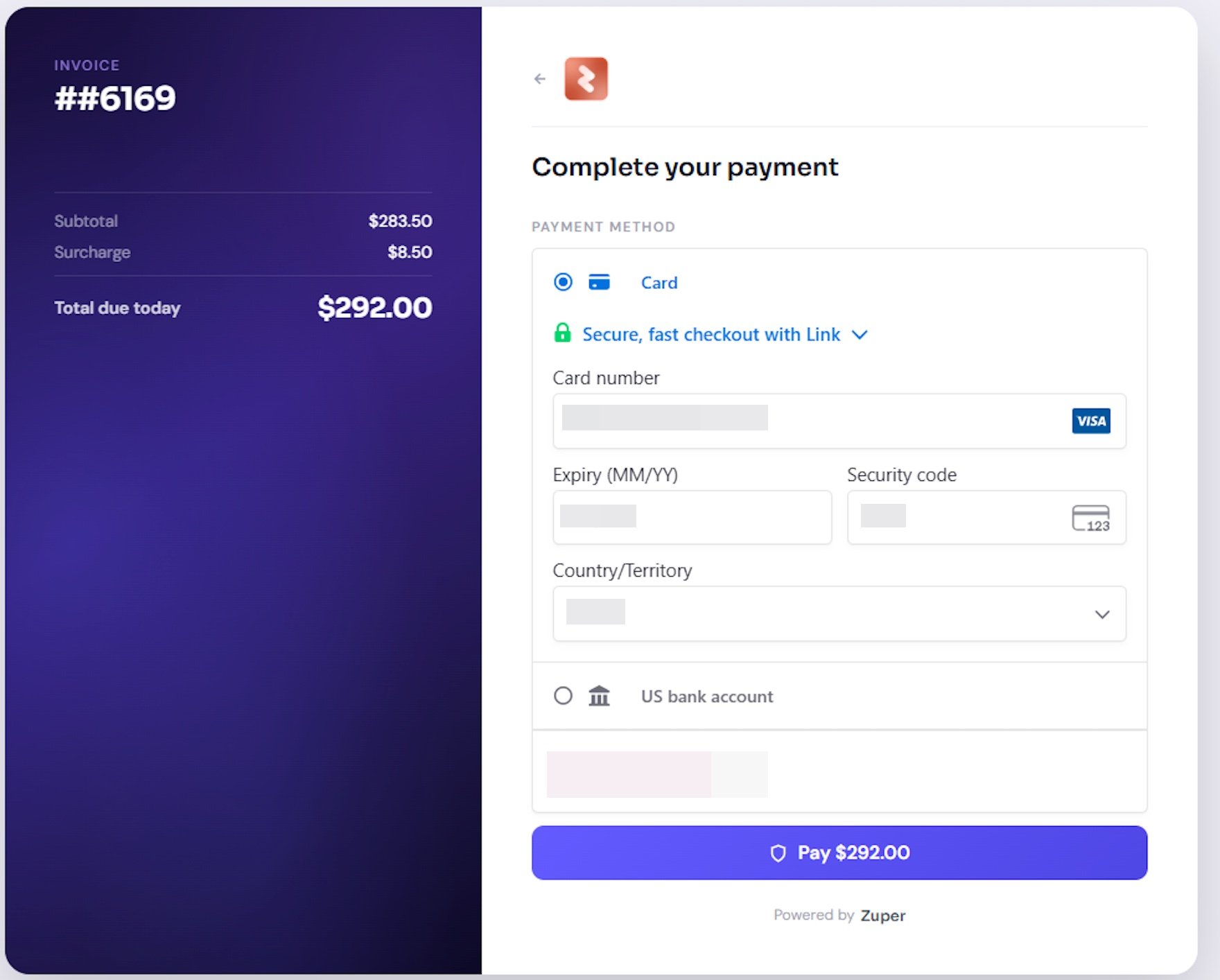 This feature is available for payments processed through **Zuper Pay** only.
## Before You Begin
* Your account is enabled for **Zuper Pay.**
* You have **Admin** permissions to access Surcharge Settings.
* You have reviewed the [Prohibited States](#prohibited-states) section below. Surcharging is not allowed in every U.S. state; check with your legal team before enabling this feature.
* Surcharges apply to **credit card payments** only. Debit and prepaid cards are not eligible.
* The surcharge you configure does not exceed the lower of **3%** or your total average cost of credit card acceptance.
**Note**: The ZIP code in the billing address of the customer/organization and the card information are used to determine surcharge eligibility and the applicable rate. Ensure both are entered accurately before processing a payment.
## Setting up Surcharge Rules
Start by setting up your surcharge rules in Settings. This is a one-time configuration that tells Zuper how much to charge based on the invoice or quote total. You can define tiered ranges so smaller invoices carry a lower fee than larger ones.
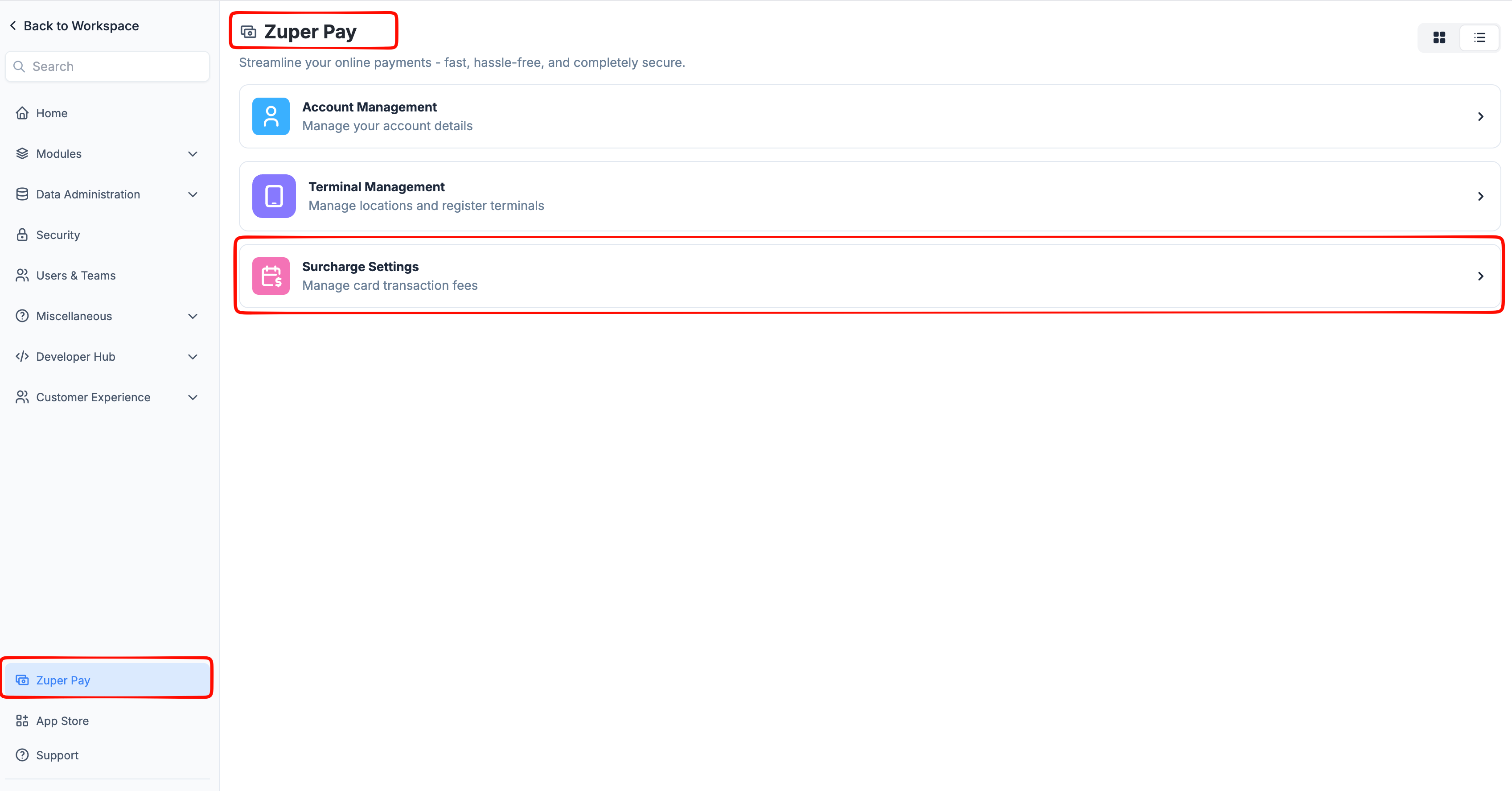
1. Navigate to the **Settings** module from the left navigation menu.
2. Select **Zuper Pay.**
3. Select **Surcharge Settings.**
This feature is available for payments processed through **Zuper Pay** only.
## Before You Begin
* Your account is enabled for **Zuper Pay.**
* You have **Admin** permissions to access Surcharge Settings.
* You have reviewed the [Prohibited States](#prohibited-states) section below. Surcharging is not allowed in every U.S. state; check with your legal team before enabling this feature.
* Surcharges apply to **credit card payments** only. Debit and prepaid cards are not eligible.
* The surcharge you configure does not exceed the lower of **3%** or your total average cost of credit card acceptance.
**Note**: The ZIP code in the billing address of the customer/organization and the card information are used to determine surcharge eligibility and the applicable rate. Ensure both are entered accurately before processing a payment.
## Setting up Surcharge Rules
Start by setting up your surcharge rules in Settings. This is a one-time configuration that tells Zuper how much to charge based on the invoice or quote total. You can define tiered ranges so smaller invoices carry a lower fee than larger ones.
1. Navigate to the **Settings** module from the left navigation menu.
2. Select **Zuper Pay.**
3. Select **Surcharge Settings.**
 4. Toggle **Enable Surcharge Fee** to **On.**
5. Read and accept the consent form to activate the feature.
6. In the **Select a State** field, choose the state of your business operation.
**Warning**: Some states prohibit or restrict credit card surcharging.
7. Under **Define Surcharge Fee Range**, set up your tiers:
1. Enter the **Minimum Amount.**
2. Enter the **Maximum Amount.**
3. Enter the **Surcharge Percentage** for that range.
4. Click **+ Add New Range** to add additional tiers and repeat.
4. Toggle **Enable Surcharge Fee** to **On.**
5. Read and accept the consent form to activate the feature.
6. In the **Select a State** field, choose the state of your business operation.
**Warning**: Some states prohibit or restrict credit card surcharging.
7. Under **Define Surcharge Fee Range**, set up your tiers:
1. Enter the **Minimum Amount.**
2. Enter the **Maximum Amount.**
3. Enter the **Surcharge Percentage** for that range.
4. Click **+ Add New Range** to add additional tiers and repeat.
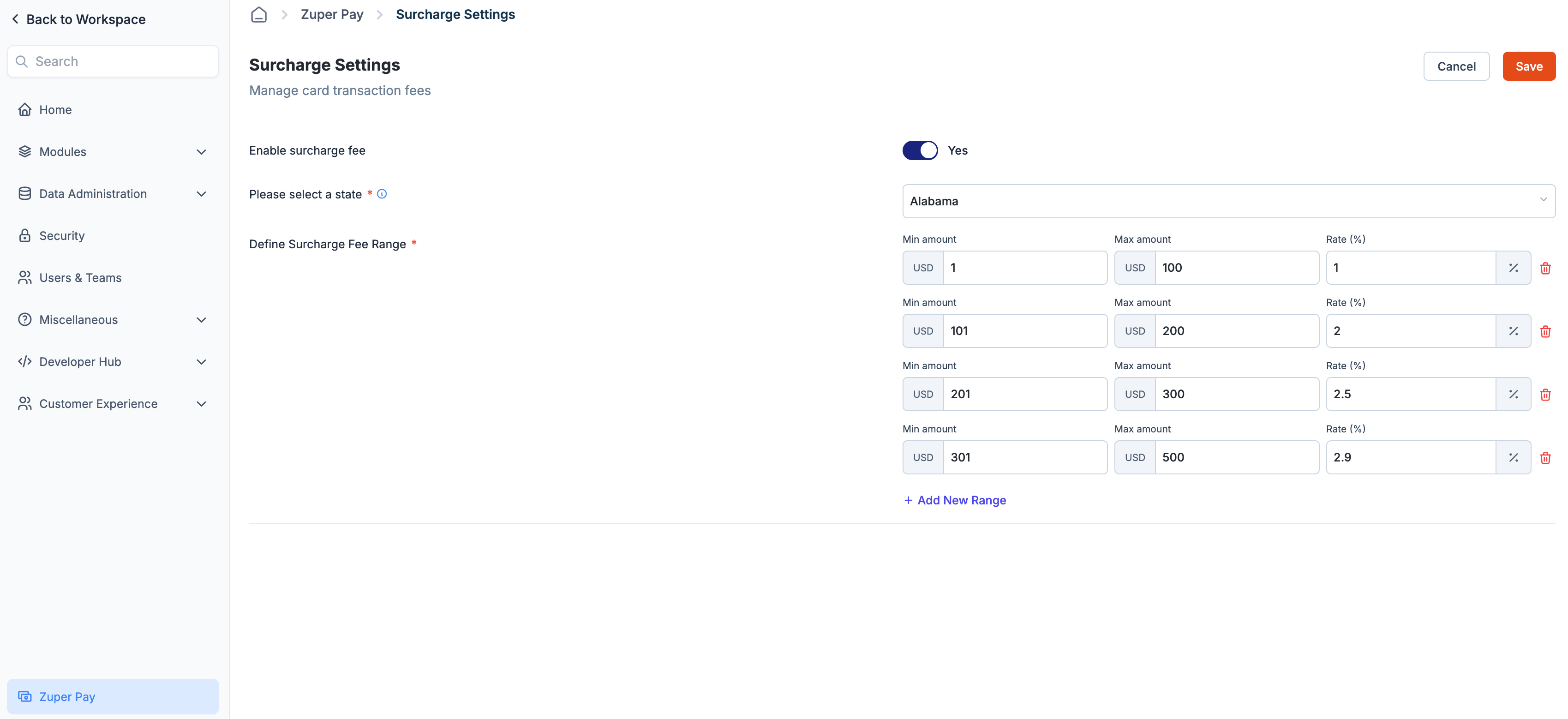 8. Click **Save.**
If a transaction total falls outside your configured ranges, no surcharge will be applied even if the feature is enabled. Ensure your tiers cover the invoice and quote amounts you expect to process.
## Surcharge on Invoices and Quote Deposits
Once the surcharge is configured in Settings, it is automatically enabled on all invoices and quote deposits by default. You do not need to turn it on per transaction.
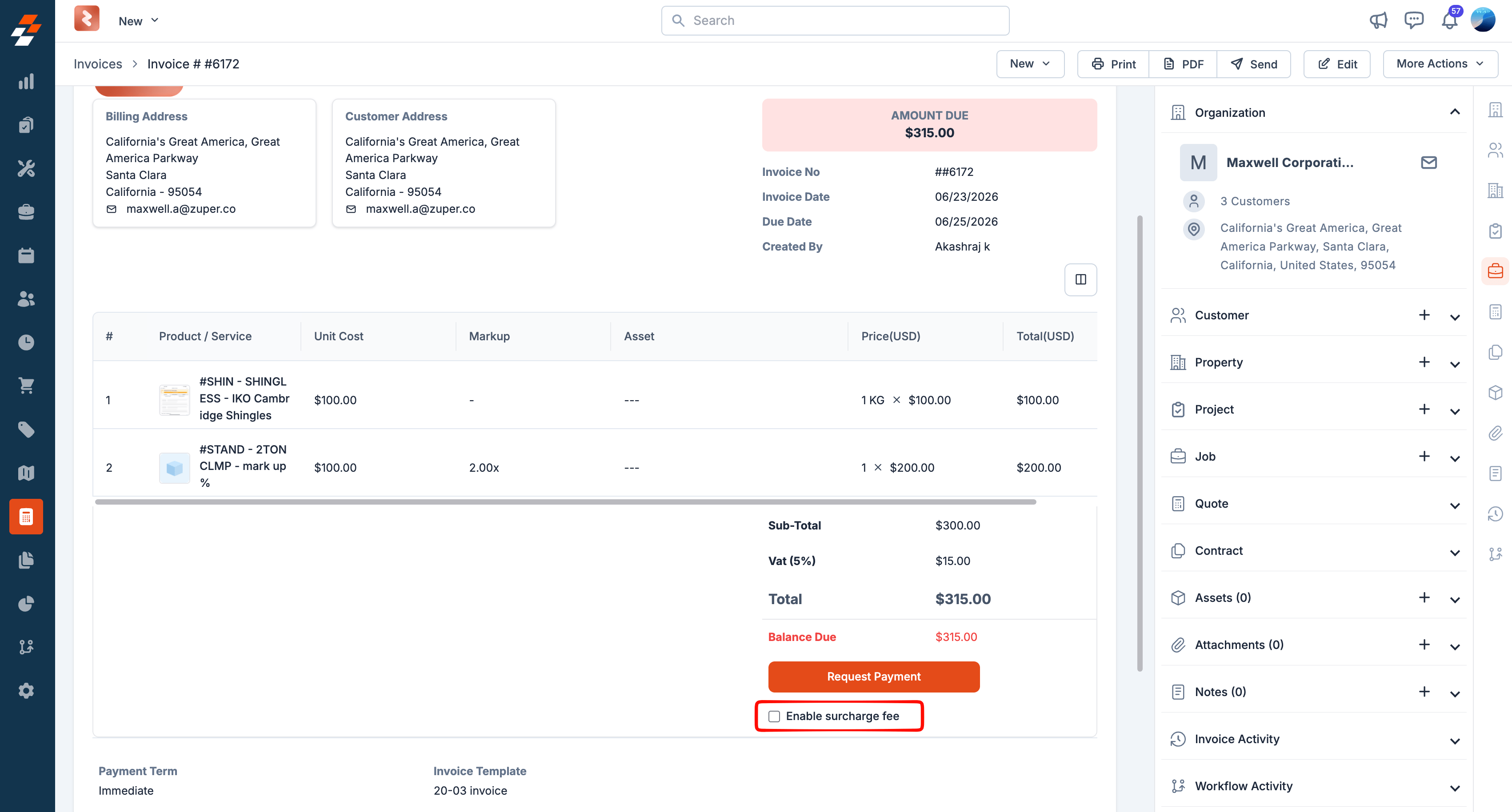
If you want to waive the surcharge for a specific transaction, open the invoice or quote, scroll to the bottom of the page, and uncheck **Enable Surcharge Fee.** The surcharge will not be applied to that transaction, and your organization-wide settings remain unchanged.
8. Click **Save.**
If a transaction total falls outside your configured ranges, no surcharge will be applied even if the feature is enabled. Ensure your tiers cover the invoice and quote amounts you expect to process.
## Surcharge on Invoices and Quote Deposits
Once the surcharge is configured in Settings, it is automatically enabled on all invoices and quote deposits by default. You do not need to turn it on per transaction.
If you want to waive the surcharge for a specific transaction, open the invoice or quote, scroll to the bottom of the page, and uncheck **Enable Surcharge Fee.** The surcharge will not be applied to that transaction, and your organization-wide settings remain unchanged.
 **Note**: When a surcharge is configured in Settings, it applies automatically to all automatic payments. See the [Automatic Payments](#automatic-payments) section below for compliance requirements.
## How the surcharge is applied
When a customer pays an invoice or quote using a credit card, Zuper automatically calculates and applies the surcharge based on your configured tier rules.
For example, if you have configured a surcharge of 3% for amounts between 1,001 and 2,000, and a customer receives an invoice for 60.00. The customer sees the surcharge as a separate line item before confirming payment and is charged a total of \$2,060.00.
The surcharge amount is determined by the invoice or quote total and the tier that matches that amount.
**Note**: Two values determine the surcharge applied to each transaction: the rate you configured in your tier rules and the maximum rate calculated by Zuper's surcharge compliance service based on card brand rules and state regulations. Whichever is lower applies to the customer's transaction.
### Payment Method Considerations
Surcharges apply to credit card payments only. If the customer pays with a debit or prepaid card, the surcharge is automatically removed, and the customer is charged the original invoice amount only.
Zuper supports surcharge collection for both card-present and card-not-present credit card transactions.
* **Card Present**
* **Card Not Present**
While customers see the surcharge added to their payment total, Zuper Pay calculates its processing fee separately based on the payment method used. The processing fee is applied to the total amount collected - including the surcharge.
In the example above, the customer pays \$2,060.00. Zuper Pay calculates the applicable processing fee on the full 2,060.00 and deducts it before settling the remaining funds to your account.
## Automatic Payments
When a surcharge is configured in Settings, it applies automatically to all automatic payments without requiring any action at the transaction level.
Before enabling surcharges on automatic payments, you must notify your customer at least 30 days in advance that a surcharge will be applied to their payments. This is a compliance requirement. Failure to provide advance notice may result in a violation of card brand rules.
## Processing Refunds
When you refund a transaction that included a surcharge, the surcharge is refunded in proportion to the refund amount.
* **Full refund:** The customer receives the full amount back, including the surcharge.
* **Partial refund:** The surcharge is partially refunded in proportion to the amount refunded.
## Prohibited States
Surcharging is governed at the federal, card network, and U.S. state levels. Visa, Mastercard, AMEX, and Discover impose their own requirements, including a cap of the lower of 3% or the merchant's cost of acceptance. At the state level, some states prohibit or restrict surcharging entirely, while most allow it with conditions such as caps and disclosure requirements. Rules vary and may change.
Zuper automatically detects the service address ZIP code and disables the surcharge for restricted locations.
| State | Status |
| ------------- | ---------------------- |
| Maine | Prohibited |
| Massachusetts | Prohibited |
| Connecticut | Prohibited |
| California | Restrictions may apply |
| Mississippi | Restrictions may apply |
| New York | Restrictions may apply |
This list is subject to change. Rules vary by state and may change; for example, Oklahoma updated its surcharging rules in 2025. Always verify current state laws with your legal team before enabling surcharges.
## FAQs
No. The surcharge is capped at the lower of 3% or your total average cost of credit card acceptance. Zuper's surcharge compliance service calculates the maximum allowable rate for each transaction based on card brand rules and state regulations. Whichever rate is lower applies.
No. Your changes only apply to transactions processed after you save. To apply a new surcharge to an older invoice, void or delete it, and create a new one.
Yes. Regardless of the payment method, the customer sees a **Surcharge Notice** before the transaction is finalised. They must confirm before the payment is processed.
Yes. The surcharge appears as a separate line item on the payment.
The full amount is refunded to the customer, including the surcharge.
The surcharge is refunded on a rate basis. The same percentage refunded from the invoice total is applied to the surcharge amount. For example, if you refund 50% of the invoice, 50% of the surcharge is also refunded.
Yes. Open the invoice or quote, scroll to the bottom, and uncheck **Enable Surcharge Fee.** The surcharge will not apply to that transaction, and your settings remain unchanged for all other transactions.
Yes. You must notify your customers at least 30 days in advance before surcharges are applied to their automatic payments. This is a card brand compliance requirement.
**Note**: When a surcharge is configured in Settings, it applies automatically to all automatic payments. See the [Automatic Payments](#automatic-payments) section below for compliance requirements.
## How the surcharge is applied
When a customer pays an invoice or quote using a credit card, Zuper automatically calculates and applies the surcharge based on your configured tier rules.
For example, if you have configured a surcharge of 3% for amounts between 1,001 and 2,000, and a customer receives an invoice for 60.00. The customer sees the surcharge as a separate line item before confirming payment and is charged a total of \$2,060.00.
The surcharge amount is determined by the invoice or quote total and the tier that matches that amount.
**Note**: Two values determine the surcharge applied to each transaction: the rate you configured in your tier rules and the maximum rate calculated by Zuper's surcharge compliance service based on card brand rules and state regulations. Whichever is lower applies to the customer's transaction.
### Payment Method Considerations
Surcharges apply to credit card payments only. If the customer pays with a debit or prepaid card, the surcharge is automatically removed, and the customer is charged the original invoice amount only.
Zuper supports surcharge collection for both card-present and card-not-present credit card transactions.
* **Card Present**
* **Card Not Present**
While customers see the surcharge added to their payment total, Zuper Pay calculates its processing fee separately based on the payment method used. The processing fee is applied to the total amount collected - including the surcharge.
In the example above, the customer pays \$2,060.00. Zuper Pay calculates the applicable processing fee on the full 2,060.00 and deducts it before settling the remaining funds to your account.
## Automatic Payments
When a surcharge is configured in Settings, it applies automatically to all automatic payments without requiring any action at the transaction level.
Before enabling surcharges on automatic payments, you must notify your customer at least 30 days in advance that a surcharge will be applied to their payments. This is a compliance requirement. Failure to provide advance notice may result in a violation of card brand rules.
## Processing Refunds
When you refund a transaction that included a surcharge, the surcharge is refunded in proportion to the refund amount.
* **Full refund:** The customer receives the full amount back, including the surcharge.
* **Partial refund:** The surcharge is partially refunded in proportion to the amount refunded.
## Prohibited States
Surcharging is governed at the federal, card network, and U.S. state levels. Visa, Mastercard, AMEX, and Discover impose their own requirements, including a cap of the lower of 3% or the merchant's cost of acceptance. At the state level, some states prohibit or restrict surcharging entirely, while most allow it with conditions such as caps and disclosure requirements. Rules vary and may change.
Zuper automatically detects the service address ZIP code and disables the surcharge for restricted locations.
| State | Status |
| ------------- | ---------------------- |
| Maine | Prohibited |
| Massachusetts | Prohibited |
| Connecticut | Prohibited |
| California | Restrictions may apply |
| Mississippi | Restrictions may apply |
| New York | Restrictions may apply |
This list is subject to change. Rules vary by state and may change; for example, Oklahoma updated its surcharging rules in 2025. Always verify current state laws with your legal team before enabling surcharges.
## FAQs
No. The surcharge is capped at the lower of 3% or your total average cost of credit card acceptance. Zuper's surcharge compliance service calculates the maximum allowable rate for each transaction based on card brand rules and state regulations. Whichever rate is lower applies.
No. Your changes only apply to transactions processed after you save. To apply a new surcharge to an older invoice, void or delete it, and create a new one.
Yes. Regardless of the payment method, the customer sees a **Surcharge Notice** before the transaction is finalised. They must confirm before the payment is processed.
Yes. The surcharge appears as a separate line item on the payment.
The full amount is refunded to the customer, including the surcharge.
The surcharge is refunded on a rate basis. The same percentage refunded from the invoice total is applied to the surcharge amount. For example, if you refund 50% of the invoice, 50% of the surcharge is also refunded.
Yes. Open the invoice or quote, scroll to the bottom, and uncheck **Enable Surcharge Fee.** The surcharge will not apply to that transaction, and your settings remain unchanged for all other transactions.
Yes. You must notify your customers at least 30 days in advance before surcharges are applied to their automatic payments. This is a card brand compliance requirement.