> ## Documentation Index
> Fetch the complete documentation index at: https://docs.zuper.co/llms.txt
> Use this file to discover all available pages before exploring further.
# HubSpot Integration: Call & SMS Activities Sync + Send SMS from Workflows
> Learn how to sync call and SMS activities between Zuper Connect and HubSpot, view them in CRM records, and automate SMS messages directly from HubSpot Workflows.
# Overview
The **Zuper Connect ↔ HubSpot Integration** enables seamless synchronization of both **call and SMS activities** between your Zuper Connect account and HubSpot CRM.
This integration ensures that all customer communications including voice calls and text messages are automatically logged, organized, and visible in a single system of record.
**Who benefits from this integration?**
* Teams using Zuper Connect for customer communication.
* Sales and service teams in HubSpot who require complete call and message histories for improved coordination and customer context.
# Call Activities Sync
## What is Call Activities Sync?
The Call Activities Sync feature automatically logs every inbound and outbound call made through Zuper Connect into HubSpot, eliminating manual entry.
Details captured include:
1. Date & Time
2. Contact & Deal Association
3. Call direction (inbound/outbound) and outcome
4. Call duration and recording (if available)
5. AI-generated call summary (if available)
This allows teams to maintain full visibility over customer interactions, ensuring sales and service staff have accurate context at every touchpoint.
## Key Benefits
| ### Benefits | ### How it helps |
| :----------------------------: | :-------------------------------------------------------------------------------: |
| **Unified Call History** | All calls in Zuper Connect are automatically recorded in HubSpot. |
| **Better Customer Context** | Sales and service teams can view the full communication history. |
| **Improved Reporting** | Call volumes, outcomes, and deal impact can be analyzed in HubSpot. |
| **No Manual Logging** | All calls are synced automatically, preventing duplication of effort. |
| **Enhanced Team Coordination** | Service and sales teams remain aligned through shared visibility of interactions. |
## Setting Up Call Activities Sync
**Prerequisites**
Before enabling Call Sync, ensure you have:
1. An **active Zuper Connect subscription** with calling enabled
2. **HubSpot CRM account** with integration permissions
3. **Zuper–HubSpot integration** is installed.
## Configuration Steps
Once the prerequisites are met, you can configure the Call Activities Sync within Zuper Connect. Follow the steps below to complete the setup:
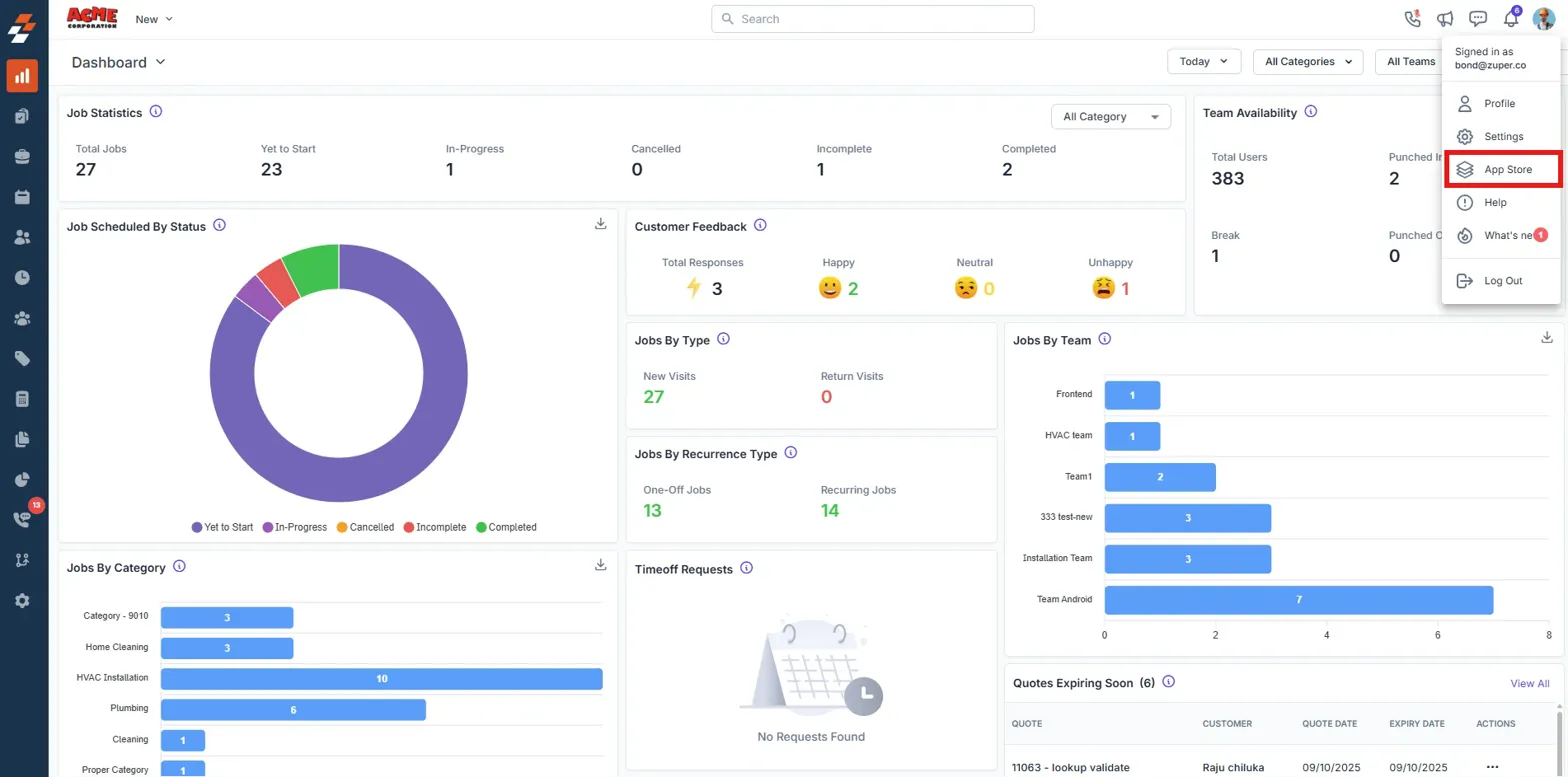
**Step 1. Open Integration Settings**
1. In **Zuper Connect**, go to your **Dashboard**
2. Click the **Profile Menu** → Select **App Store**
 **Step 2. Locate HubSpot Integration**
1. Navigate to the **CRM** category.
**Step 2. Locate HubSpot Integration**
1. Navigate to the **CRM** category.
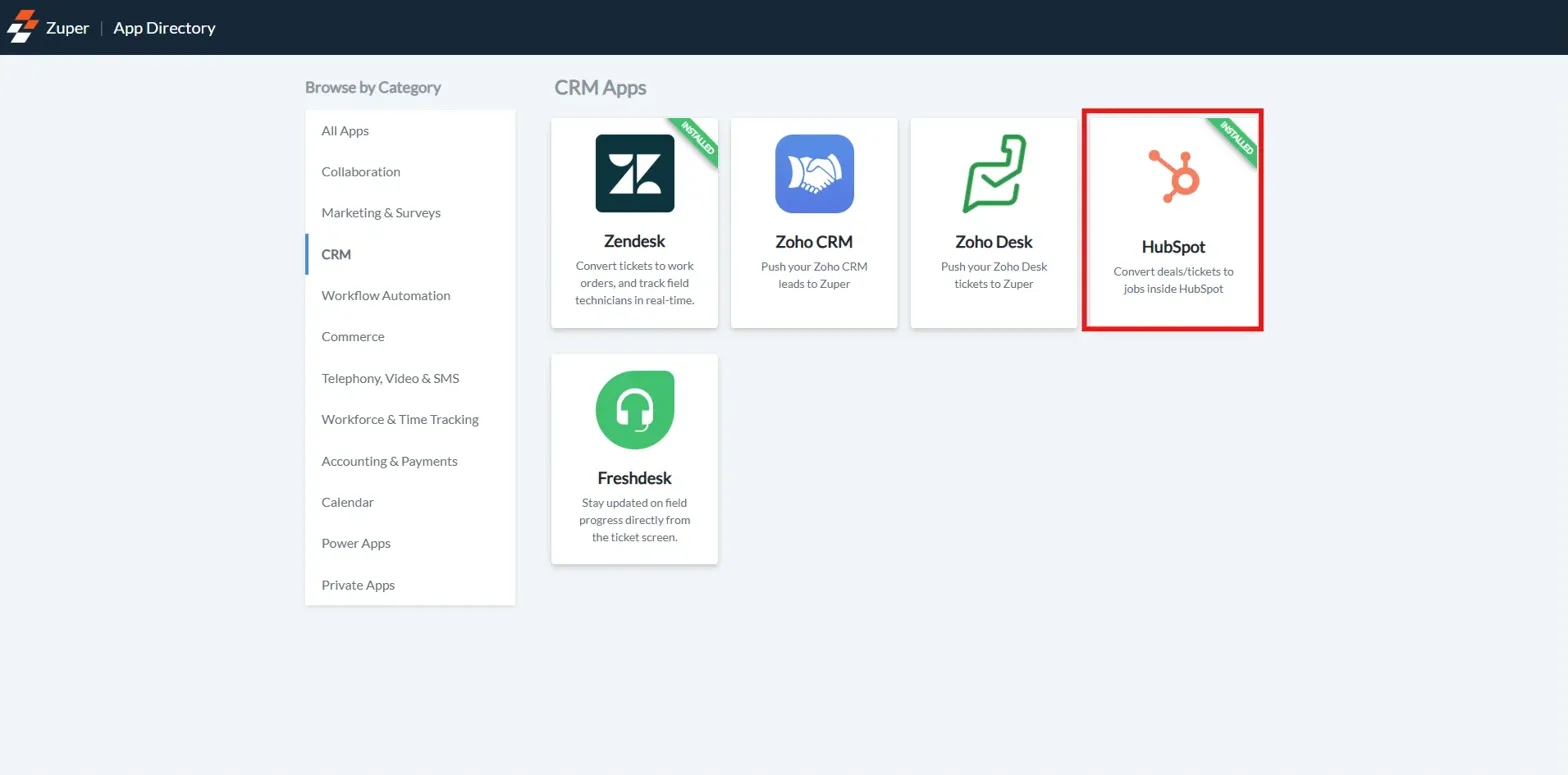
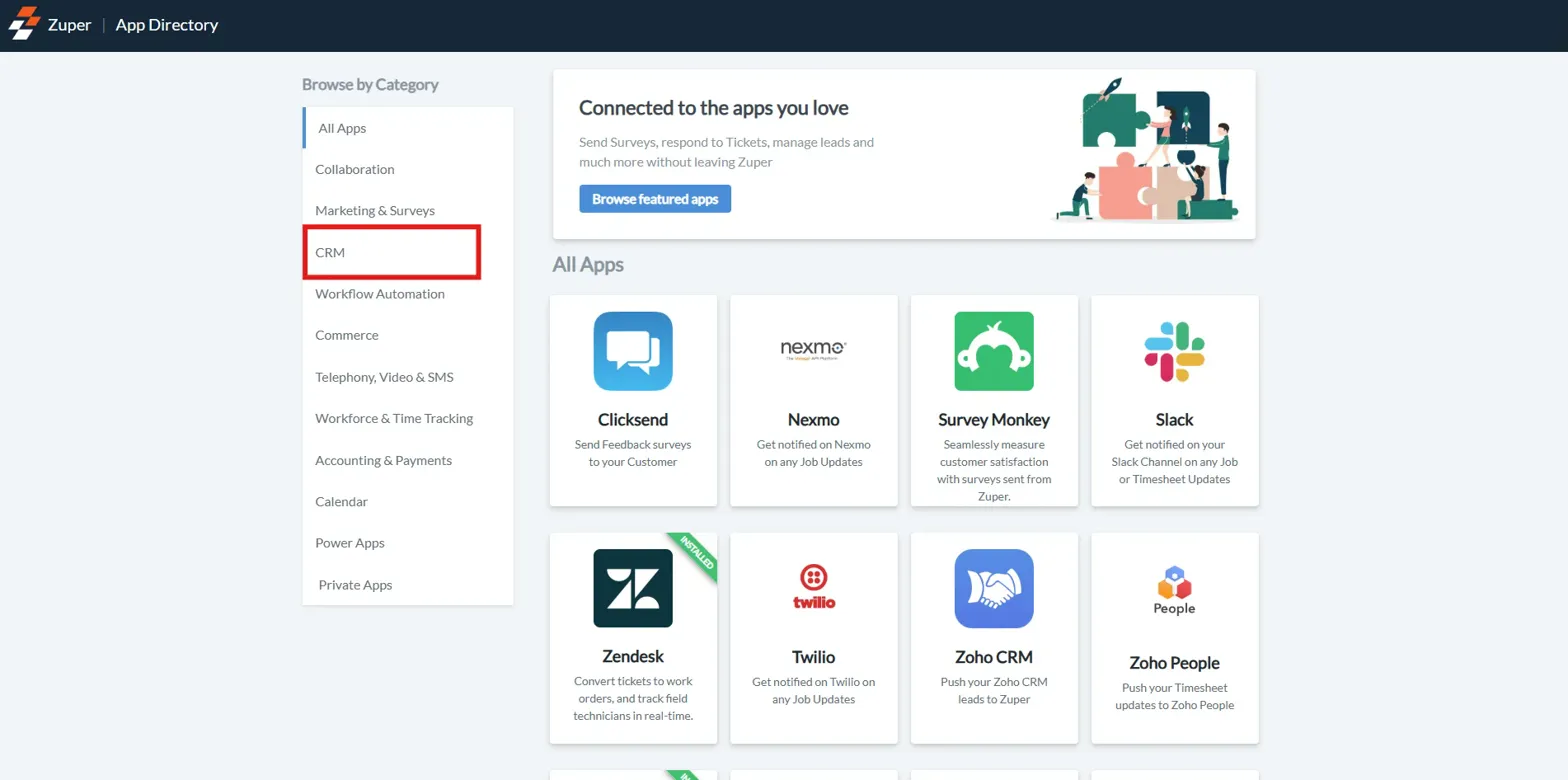 2. Select **HubSpot** from the list.
 **Step 3. Enable Call Sync**
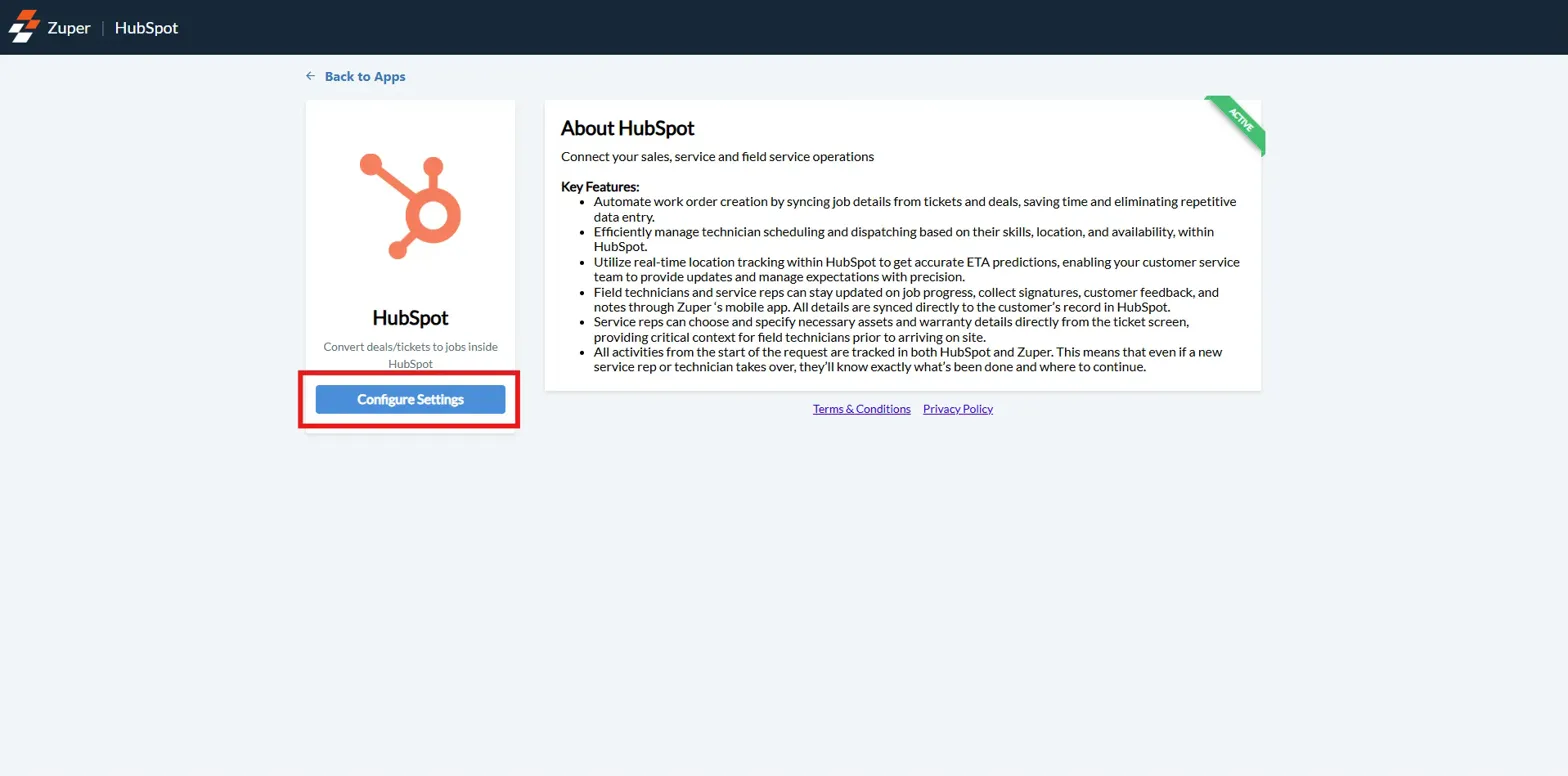
1. Click **Configure Settings.**
**Step 3. Enable Call Sync**
1. Click **Configure Settings.**
 2. Find **Sync Zuper Connect Calls with HubSpot.**
3. Set this option to **Yes.**
2. Find **Sync Zuper Connect Calls with HubSpot.**
3. Set this option to **Yes.**
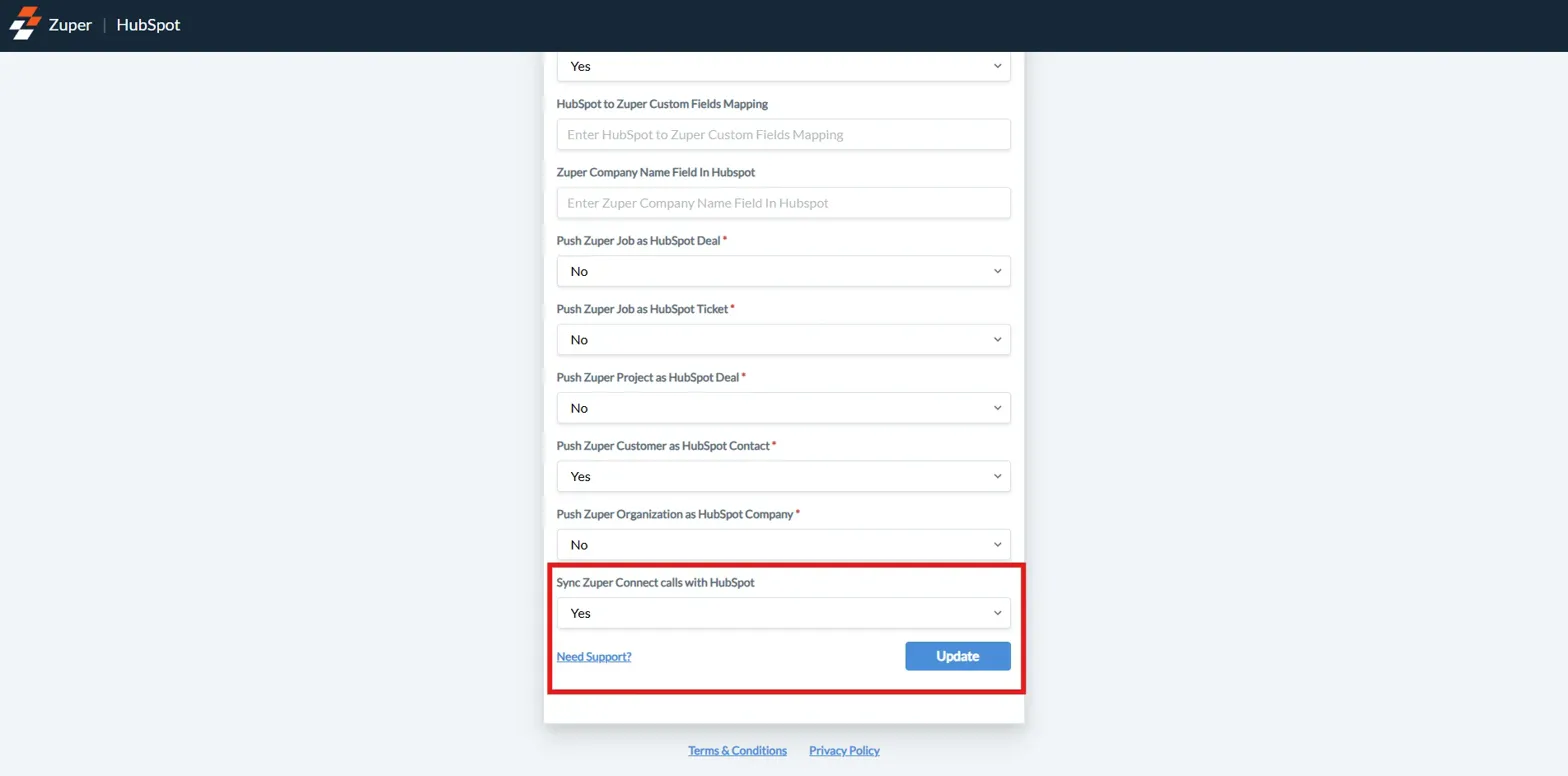 **Step 4. Save Settings**
1. Click **Update** to save your settings.
All call activities will now sync automatically to HubSpot.
## How Call Activities Appear in HubSpot
Once enabled, call activities from Zuper Connect are automatically logged in HubSpot under the respective deal, ticket, or contact records, making them easily accessible to users.
### In Deal / Ticket Records
| Where It Appears | Details Displayed |
| :-------------------------------: | :------------------------------------------------------------------------------------------------------------------------------------------------------------------------: |
| **Activities Tab → Calls Filter** | Call direction (Inbound/Outbound), Call outcome (e.g., Connected, Missed, etc.), Duration, Timestamp, Related Zuper Job, and "View in Zuper Connect" link for full details |
### In Contact Records
| Where It Appears | Details Displayed |
| :---------------------: | :---------------------------------------------------------------------------------------------------------------------------: |
| **Activities Timeline** | Chronological call logs with full context, call recordings (with playback & download links), and Job/Deal association details |
## Data Synced Between Zuper Connect & HubSpot
The integration ensures that essential call details are transferred seamlessly between Zuper Connect and HubSpot, keeping both platforms updated.
| Category | Information Synced |
| :--------------------: | :---------------------------------------------------------------: |
| **Call Details** | Date, Time, Duration, Direction, Outcome |
| **Associated Records** | HubSpot contact ↔ Zuper customer, HubSpot deal/ticket ↔ Zuper job |
| **Contextual Info** | Job references, notes, call recordings |
# SMS Activities & Workflows
## What Is SMS Activities Sync
The **SMS Activities Sync** feature automatically logs every SMS sent or received through Zuper Connect into HubSpot.
With **HubSpot Workflows**, you can also **send SMS directly from HubSpot**, automating text communication triggered by CRM events.
## Key Benefits
| Benefit | How It Helps |
| :--------------------------: | :---------------------------------------------------------------: |
| **Complete SMS History** | All SMS communications are automatically recorded in HubSpot. |
| **Better Customer Context** | See complete communication history across calls, SMS, and emails. |
| **Automated Workflow Sends** | Trigger SMS based on contact behavior or deal stage changes. |
| **No Manual Logging** | SMS are synced automatically, saving time. |
## How SMS Activities Appear in HubSpot
### In Contact Records
| Where it Appears | Details Displayed |
| :---------------------: | :-----------------------------------------------------------------------------------------------------------------: |
| **Activities Timeline** | Full message content (inbound/outbound), Timestamp and sender details, View in Zuper Connect link for full context. |
**Step 4. Save Settings**
1. Click **Update** to save your settings.
All call activities will now sync automatically to HubSpot.
## How Call Activities Appear in HubSpot
Once enabled, call activities from Zuper Connect are automatically logged in HubSpot under the respective deal, ticket, or contact records, making them easily accessible to users.
### In Deal / Ticket Records
| Where It Appears | Details Displayed |
| :-------------------------------: | :------------------------------------------------------------------------------------------------------------------------------------------------------------------------: |
| **Activities Tab → Calls Filter** | Call direction (Inbound/Outbound), Call outcome (e.g., Connected, Missed, etc.), Duration, Timestamp, Related Zuper Job, and "View in Zuper Connect" link for full details |
### In Contact Records
| Where It Appears | Details Displayed |
| :---------------------: | :---------------------------------------------------------------------------------------------------------------------------: |
| **Activities Timeline** | Chronological call logs with full context, call recordings (with playback & download links), and Job/Deal association details |
## Data Synced Between Zuper Connect & HubSpot
The integration ensures that essential call details are transferred seamlessly between Zuper Connect and HubSpot, keeping both platforms updated.
| Category | Information Synced |
| :--------------------: | :---------------------------------------------------------------: |
| **Call Details** | Date, Time, Duration, Direction, Outcome |
| **Associated Records** | HubSpot contact ↔ Zuper customer, HubSpot deal/ticket ↔ Zuper job |
| **Contextual Info** | Job references, notes, call recordings |
# SMS Activities & Workflows
## What Is SMS Activities Sync
The **SMS Activities Sync** feature automatically logs every SMS sent or received through Zuper Connect into HubSpot.
With **HubSpot Workflows**, you can also **send SMS directly from HubSpot**, automating text communication triggered by CRM events.
## Key Benefits
| Benefit | How It Helps |
| :--------------------------: | :---------------------------------------------------------------: |
| **Complete SMS History** | All SMS communications are automatically recorded in HubSpot. |
| **Better Customer Context** | See complete communication history across calls, SMS, and emails. |
| **Automated Workflow Sends** | Trigger SMS based on contact behavior or deal stage changes. |
| **No Manual Logging** | SMS are synced automatically, saving time. |
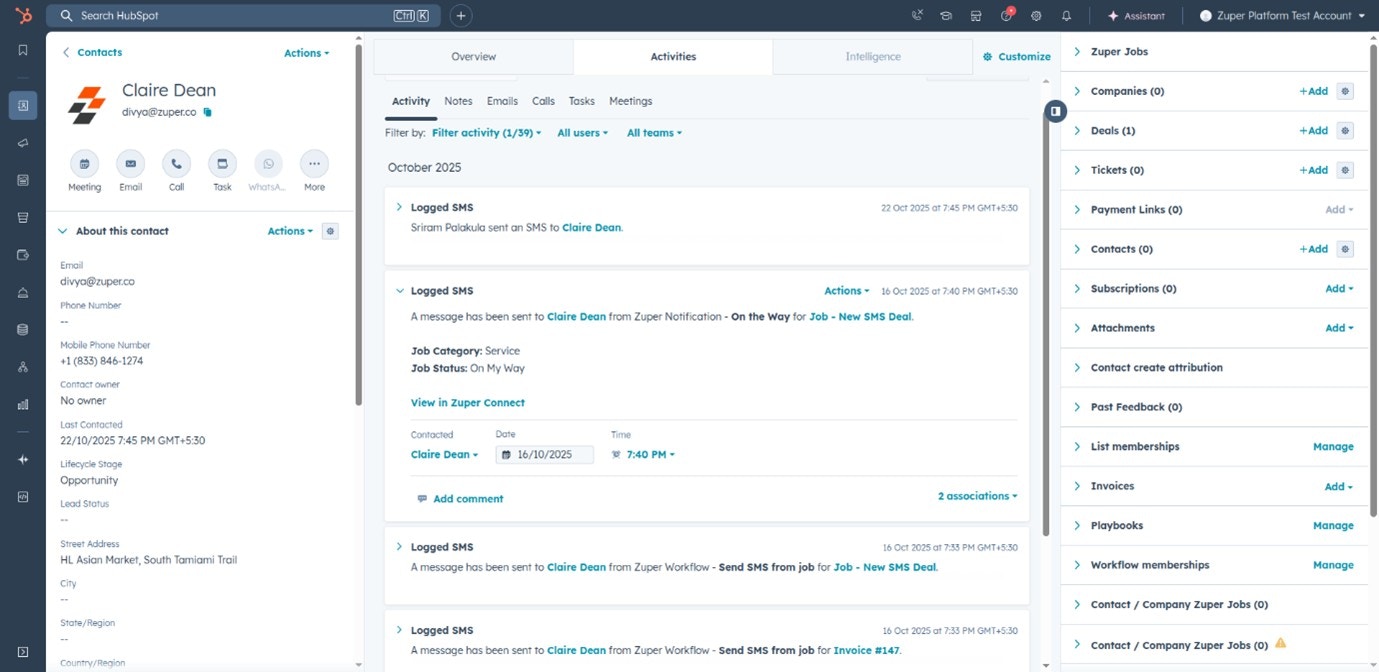
## How SMS Activities Appear in HubSpot
### In Contact Records
| Where it Appears | Details Displayed |
| :---------------------: | :-----------------------------------------------------------------------------------------------------------------: |
| **Activities Timeline** | Full message content (inbound/outbound), Timestamp and sender details, View in Zuper Connect link for full context. |
 ### In Deal / Ticket Records
| Where it Appears | Details Displayed: |
| :-----------------------------: | :---------------------------------------------------------------------------------------------------------------------: |
| **Activities Tab → SMS Filter** | Message direction (inbound/outbound), Delivery status, Timestamp, and contact information, Related Zuper Job reference. |
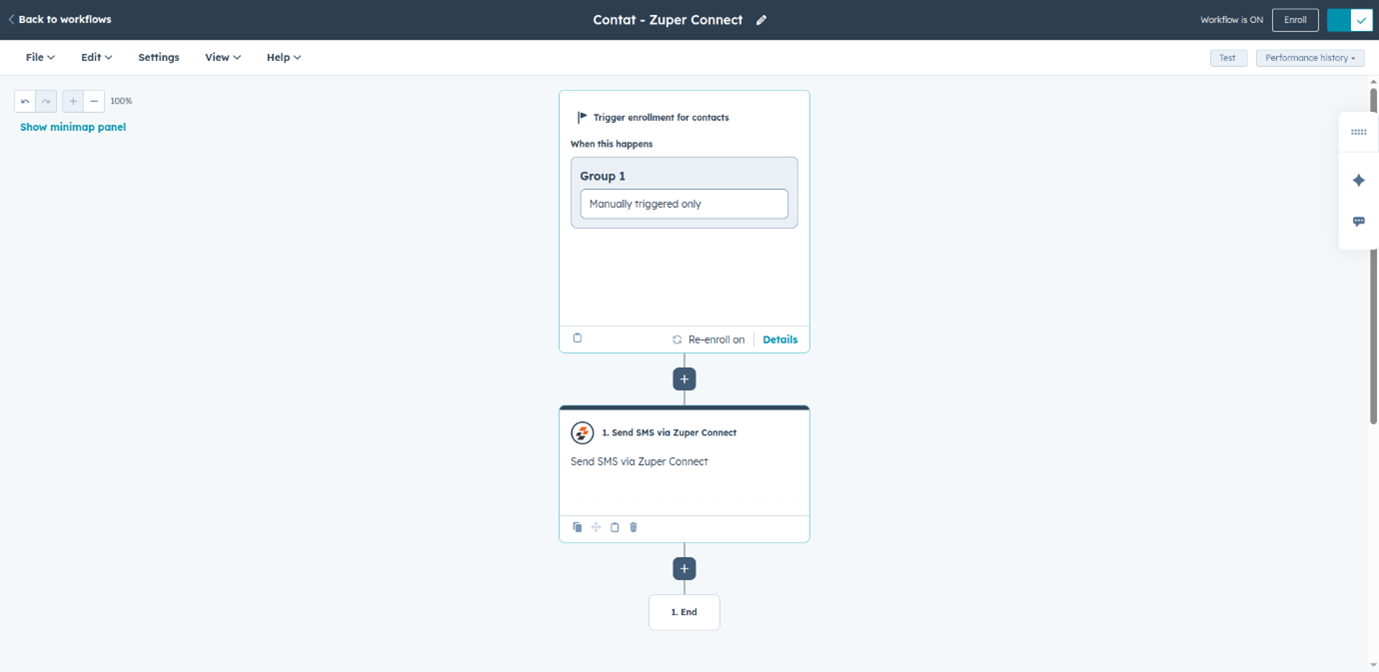
## Sending SMS via HubSpot Workflows
You can send SMS automatically through HubSpot Workflows using Zuper Connect’s Send SMS action. This enables event-driven messaging such as reminders, confirmations, and follow-ups.
### Workflow Setup Steps
* In HubSpot, go to **Automation → Workflows**.
* Create or open an existing workflow.
* Define **enrollment criteria** and trigger conditions.
### In Deal / Ticket Records
| Where it Appears | Details Displayed: |
| :-----------------------------: | :---------------------------------------------------------------------------------------------------------------------: |
| **Activities Tab → SMS Filter** | Message direction (inbound/outbound), Delivery status, Timestamp, and contact information, Related Zuper Job reference. |
## Sending SMS via HubSpot Workflows
You can send SMS automatically through HubSpot Workflows using Zuper Connect’s Send SMS action. This enables event-driven messaging such as reminders, confirmations, and follow-ups.
### Workflow Setup Steps
* In HubSpot, go to **Automation → Workflows**.
* Create or open an existing workflow.
* Define **enrollment criteria** and trigger conditions.
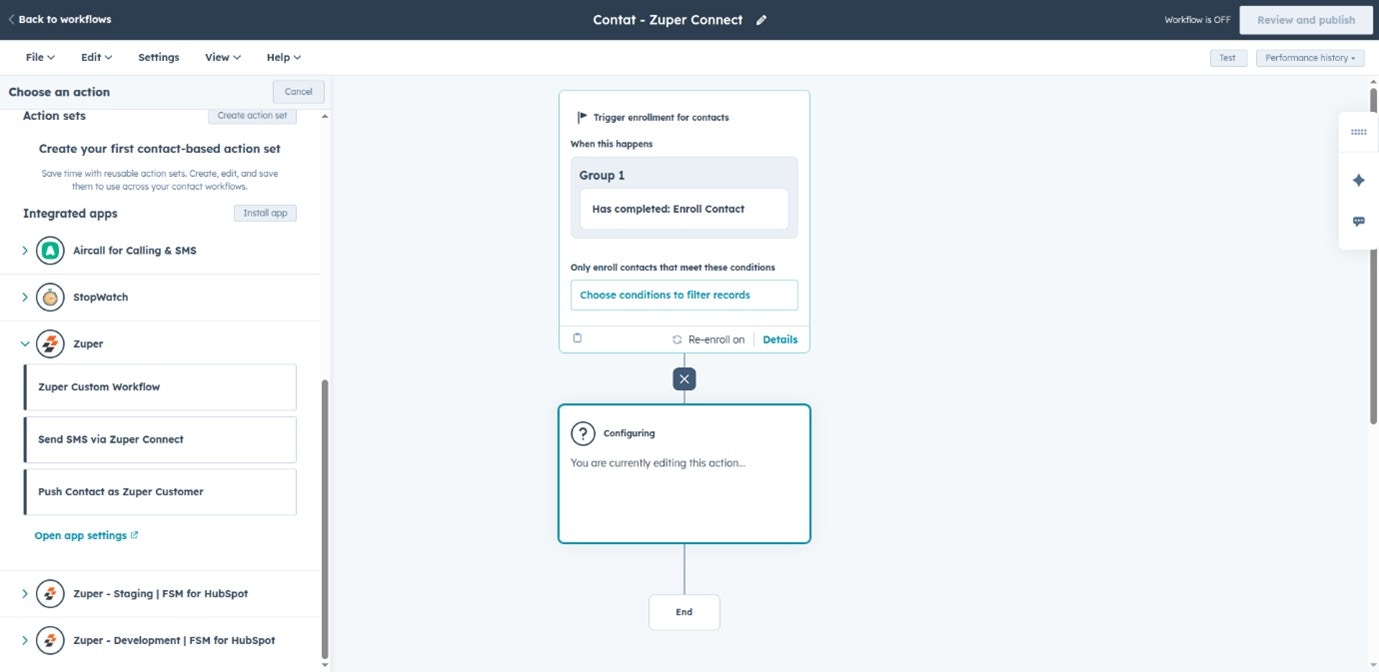 * Add a new **Action** → Search for **Send SMS via Zuper Connect**.
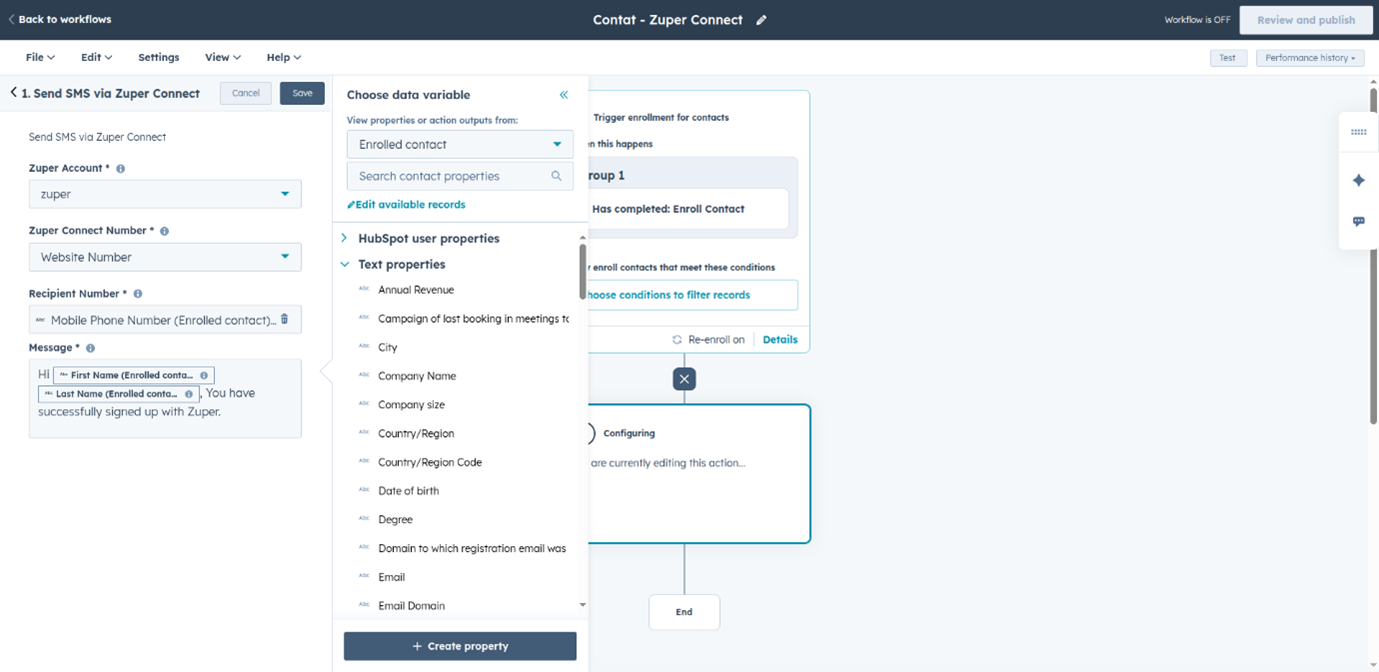
* Configure the SMS:
* Zuper Account
* Zuper Connect Number
* Recipient Number
* Message (use personalization tokens if needed)
* Add a new **Action** → Search for **Send SMS via Zuper Connect**.
* Configure the SMS:
* Zuper Account
* Zuper Connect Number
* Recipient Number
* Message (use personalization tokens if needed)
 * **Test and publish** the workflow.
 ## Data Synced Between Systems
| Category | Information Synced |
| :--------------------: | :-----------------------------------------------------: |
| **SMS Details** | Date, time, message content, direction, delivery status |
| **Associated Records** | Contact, deal, ticket, job references |
| **Contextual Info** | Agent/contact name, job details, message preview |
# Troubleshooting
If activities aren’t syncing in HubSpot as expected, use the following guidelines to identify and resolve common issues.
| Issue | Resolution |
| :-----------------------------: | :-----------------------------------------------------------------------------------------------------------------------: |
| **Calls not syncing** | Ensure “Sync Calls” is enabled in integration settings. |
| **Missing call or SMS details** | Review field mappings and verify contact associations. Also ensure deal/ticket is properly linked in Zuper |
| **Duplicate entries** | Avoid manual entries in HubSpot; review sync frequency in integration settings. |
| **SMS not syncing** | Ensure “Sync SMS” is enabled and HubSpot API key is valid. |
| **Workflow SMS not sending** | Check the recipient number field is mapped correcly, phone number validity, and workflow status is published and active. |
# Best Practices
Follow these best practices to maintain smooth integration performance and data accuracy.
## For Call and SMS Logging
* Enable both Sync Calls and Sync SMS in Zuper Connect.
* Regularly review and update HubSpot–Zuper field mappings.
* Periodically check integration status in Zuper Connect settings.
## For Workflow SMS
* Test workflows with a small set of contacts first.
* Personalize SMS messages using HubSpot contact properties.
* Avoid SMS fatigue by spacing out communications.
* Include opt-out options to maintain compliance with SMS regulations.
## Data Synced Between Systems
| Category | Information Synced |
| :--------------------: | :-----------------------------------------------------: |
| **SMS Details** | Date, time, message content, direction, delivery status |
| **Associated Records** | Contact, deal, ticket, job references |
| **Contextual Info** | Agent/contact name, job details, message preview |
# Troubleshooting
If activities aren’t syncing in HubSpot as expected, use the following guidelines to identify and resolve common issues.
| Issue | Resolution |
| :-----------------------------: | :-----------------------------------------------------------------------------------------------------------------------: |
| **Calls not syncing** | Ensure “Sync Calls” is enabled in integration settings. |
| **Missing call or SMS details** | Review field mappings and verify contact associations. Also ensure deal/ticket is properly linked in Zuper |
| **Duplicate entries** | Avoid manual entries in HubSpot; review sync frequency in integration settings. |
| **SMS not syncing** | Ensure “Sync SMS” is enabled and HubSpot API key is valid. |
| **Workflow SMS not sending** | Check the recipient number field is mapped correcly, phone number validity, and workflow status is published and active. |
# Best Practices
Follow these best practices to maintain smooth integration performance and data accuracy.
## For Call and SMS Logging
* Enable both Sync Calls and Sync SMS in Zuper Connect.
* Regularly review and update HubSpot–Zuper field mappings.
* Periodically check integration status in Zuper Connect settings.
## For Workflow SMS
* Test workflows with a small set of contacts first.
* Personalize SMS messages using HubSpot contact properties.
* Avoid SMS fatigue by spacing out communications.
* Include opt-out options to maintain compliance with SMS regulations.